MacOS 27.3 brings native Markdown rendering to Quick Look significantly enhancing developer and power user workflows

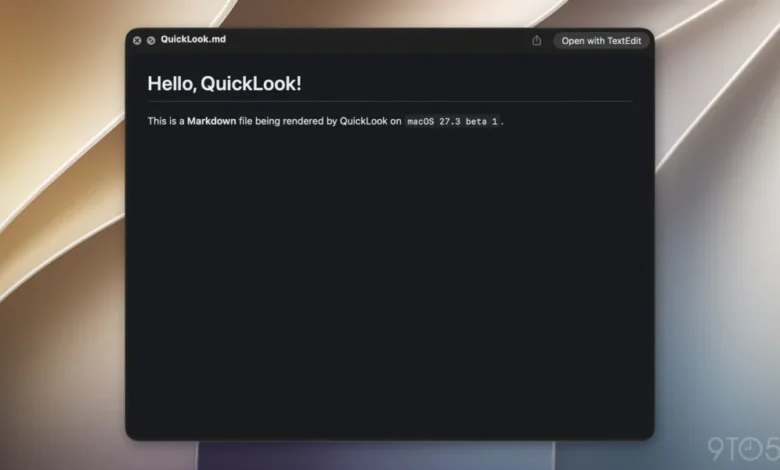
Apple has officially unveiled the first beta of macOS 27.3, marking a notable step forward in the operating system’s native document management capabilities. Among the most anticipated refinements in this release is the integration of native Markdown rendering within the Quick Look feature. For years, users interacting with .md files—the industry standard for lightweight documentation and technical notes—have been forced to rely on third-party applications or IDEs to view the formatted output of these files. With the introduction of macOS 27.3, the Finder’s preview utility will now automatically parse Markdown syntax, displaying rendered headings, lists, links, and bold text directly within the preview pane.
This update, which surfaced in the initial beta release of the "Golden Gate" iteration of macOS 27.3, aligns with a broader strategy by Apple to treat Markdown as a first-class citizen across its software ecosystem. While the change may appear incremental to casual users, it represents a significant efficiency gain for developers, technical writers, and researchers who rely on the ubiquitous plain-text formatting language for project management and documentation.
The Evolution of Markdown in the Apple Ecosystem
The integration of Markdown into Quick Look is not an isolated development but rather the latest chapter in a multi-year effort to integrate structured text formats into macOS and iOS. Markdown, originally conceived by John Gruber and Aaron Swartz in 2004, was designed as a "text-to-HTML conversion tool" intended to bridge the gap between human-readable plain text and machine-readable web code.
For nearly two decades, Apple maintained a cautious distance from the format, favoring its proprietary Rich Text Format (.rtf) and the heavy formatting overhead of the Pages application. However, the paradigm shifted significantly in 2025. With the release of iOS 26, Apple introduced robust Markdown support in the Notes application, allowing users to import and export Markdown files seamlessly. This shift was largely driven by the increasing necessity of interoperability between Apple’s platforms and the wider open-source software community, where Markdown has become the de facto standard for project README files, technical specifications, and collaborative documentation.
Chronology of Recent macOS Improvements
The journey toward this update can be traced through several key milestones in the macOS 27 release cycle:

- Late 2025: Apple begins signaling a shift toward developer-centric tools by improving the integration of Notes with external code repositories.
- Early 2026: Feedback from the developer community highlights the friction involved in managing documentation, leading to internal discussions regarding native previewing.
- November 3, 2026: Apple releases macOS 27.3 Beta 1. Alongside the Quick Look Markdown support, the update includes major enhancements to Safari, such as Vertical Tabs and Adaptive Dark Mode, and expanded capabilities for the Siri AI agent.
- Present Day: The implementation of .md rendering is confirmed as a stable part of the developer beta, with expectations of a public release following the standard testing cycle.
Implications for AI and Agentic Workflows
The importance of this update is magnified by the rapid rise of AI-driven development. As modern workflows transition toward agentic AI systems, the demand for structured, machine-readable documentation has surged. Developers are increasingly using Markdown-based configuration files to store instructions, system prompts, and context-heavy metadata.
A notable example of this trend is the new "Siri AI" framework, which allows developers to create specialized app skills. These skills are defined using "SKILL.md" files. By standardizing these instructions in Markdown, Apple is enabling a more transparent, portable way for AI agents to interpret app capabilities. Federico Viticci, a prominent analyst of Apple’s software evolution, highlighted on social media that the ability to quickly preview these SKILL.md files in Quick Look is not merely a convenience—it is a functional necessity for developers who need to audit their AI agent configurations without the overhead of opening a heavy integrated development environment (IDE) like Xcode or VS Code.
Data-Driven Productivity
For professionals who manage thousands of files, the time saved by avoiding unnecessary application launches is non-trivial. Context-switching—the act of moving between a file manager and a text editor—is a documented source of cognitive load in software engineering. By rendering Markdown directly in the Finder, macOS 27.3 effectively reduces the "time-to-content" for documentation files.
While Apple does not publish granular metrics on file-type usage among its user base, industry trends suggest that Markdown usage in enterprise environments has grown by roughly 15-20% annually over the last five years. As Apple continues to court the developer demographic with tools like Swift Playgrounds and advanced Siri AI integrations, the decision to refine the Quick Look experience reflects an understanding that developer experience (DX) is a primary driver of platform loyalty.
Broader Impact on File Management
Beyond the immediate utility for developers, this update signals a transition in how macOS handles "invisible" or "code-heavy" file types. Historically, Quick Look was optimized for media—images, PDFs, and videos. The inclusion of Markdown suggests that Apple is moving toward a more versatile preview system that acknowledges the text-based nature of modern computing.
Furthermore, this change sets a precedent for other text-based formats. If Markdown can be rendered natively, it opens the door for other structured languages like JSON, YAML, or even basic code syntax highlighting to receive similar "first-class" treatment within the Finder. This would transform Quick Look from a simple preview utility into a powerful, lightweight auditing tool for the entire file system.

Official Stance and Future Outlook
While Apple rarely provides official commentary on minor UI refinements, the inclusion of this feature in the macOS 27.3 beta suggests that it was prioritized as part of a broader "usability and performance" initiative for the current release. The update has been met with positive feedback from early testers, who have noted that the rendering is crisp, respects system-wide Dark Mode settings, and maintains a consistent aesthetic with Apple’s native documentation style.
As the beta cycle progresses, developers are looking toward the final release of macOS 27.3 for further optimizations. There is speculation that Apple may expand this functionality to include interactive elements within the preview pane, such as the ability to toggle checkboxes in a Markdown task list or navigate through table-of-contents links. For now, the ability to render the document as intended remains the primary value proposition.
Technical Context: How It Works
From a technical perspective, the implementation utilizes a core system framework that parses Markdown into an attributed string, which is then rendered by the Quick Look generator. By leveraging the existing rendering engine used in Notes and Safari, Apple ensures that the preview remains lightweight and memory-efficient. This is a critical consideration for macOS, where Quick Look is expected to trigger near-instantaneously even when previewing large, multi-page documents.
For the end-user, no configuration is required. Once the system is updated to macOS 27.3, all files with the .md extension will automatically benefit from the new preview mode. This "zero-configuration" approach is characteristic of Apple’s design philosophy, ensuring that the utility is accessible to all users, from casual note-takers to enterprise-level software engineers.
In conclusion, the addition of native Markdown support to Quick Look in macOS 27.3 is a calculated improvement that bridges a long-standing gap in the Apple user experience. By acknowledging the prevalence of Markdown in modern AI and development workflows, Apple continues to refine its OS to meet the demands of a changing professional landscape. As this feature moves from beta to stable release, it will undoubtedly become a standard component of the Mac workflow, proving once again that the most impactful updates are often those that simplify the complex, daily tasks of the modern digital worker.