AWS CloudFormation Introduces Express Mode to Dramatically Accelerate Infrastructure Deployments

Amazon Web Services (AWS) has unveiled AWS CloudFormation Express mode, a significant enhancement to its popular infrastructure-as-code service. This new deployment option is designed to drastically reduce the time it takes to provision and update cloud resources, particularly benefiting developers engaged in iterative workflows and AI-driven infrastructure development. By optimizing the deployment process, Express mode promises to deliver deployments up to four times faster, a move that could significantly boost developer productivity and streamline production environments.
The core innovation of CloudFormation Express mode lies in its revised approach to deployment completion. Traditionally, AWS CloudFormation deployments involve comprehensive stabilization checks after resources are configured. These checks are crucial for ensuring that resources are fully operational and capable of serving traffic before a deployment is marked as complete. This thoroughness is essential for many critical production scenarios where immediate resource readiness is paramount. However, for a substantial number of use cases, particularly during the rapid iteration cycles of development, these extensive stabilization checks introduce unnecessary delays.
Express mode fundamentally alters this by allowing deployments to conclude once the initial resource configuration is successfully applied. The service then continues to monitor and ensure resources become fully operational in the background. This shift means that developers receive faster feedback on their infrastructure changes, enabling quicker iteration and debugging. The system is also engineered with built-in resilience; CloudFormation will automatically retry provisioning for dependent resources that encounter transient failures during this background stabilization process, eliminating the need for manual intervention. This ensures that even with a faster completion signal, the overall provisioning process remains robust and self-healing.
Understanding the Mechanics of Express Mode
At its heart, Express mode doesn’t alter how resources are provisioned but rather when the deployment process is considered finished from the user’s perspective. In standard CloudFormation deployments, after a resource’s configuration is applied (e.g., an EC2 instance is launched and configured, or an SQS queue is created), CloudFormation initiates a series of checks to confirm its readiness. These checks can include verifying network accessibility, checking for application health endpoints, or ensuring that a database is accepting connections. The duration of these checks can vary significantly depending on the resource type and its complexity.
Express mode bypasses these extended post-configuration stabilization checks. Upon successful application of the resource’s configuration, CloudFormation signals the deployment as complete. However, the provisioning and stabilization of the resources continue asynchronously. This is particularly beneficial for AI tools that are generating and deploying infrastructure code, as sub-minute feedback loops are critical for efficient model training and refinement. Developers working on prototypes or developing individual application components can also benefit immensely from this accelerated feedback.
Quantifiable Speed Improvements
To illustrate the impact of Express mode, AWS has provided compelling examples. The creation of an Amazon Simple Queue Service (SQS) queue with a dead-letter queue (DLQ), which typically takes approximately 64 seconds in standard mode, can now be completed in as little as 10 seconds using Express mode. This represents a more than six-fold reduction in deployment time for this common service.
Even more dramatic are the improvements seen in more complex scenarios. The deletion of an AWS Lambda function that involves the detachment of network interface attachments, a process that can commonly take between 20 to 30 minutes in standard mode, can now be finalized in under 10 seconds with Express mode. These benchmarks highlight the substantial time savings available, particularly for operations that involve resource cleanup or intricate configuration dependencies. These figures are based on internal benchmarking conducted by AWS, demonstrating the tangible benefits of the new mode.
Enabling Express Mode: A Seamless Integration
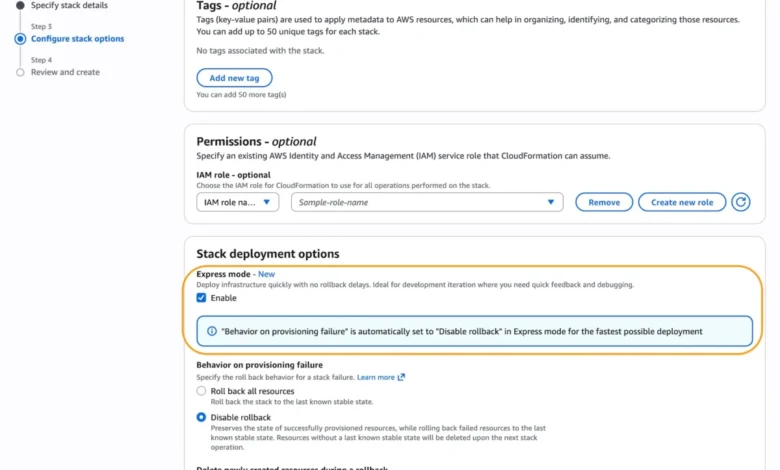
Integrating CloudFormation Express mode into existing workflows is designed to be straightforward. Users can enable Express mode directly within the AWS Management Console when creating a new CloudFormation stack. Under the "Stack deployment options," there is a clear toggle to "Enable Express mode."
For users who prefer programmatic deployment, Express mode is readily available through the AWS Command Line Interface (AWS CLI) and AWS Software Development Kits (SDKs). When using the AWS CLI, enabling Express mode is achieved by setting the --deployment-config parameter to EXPRESS during stack creation, update, or deletion operations. The following example demonstrates how to enable Express mode with rollback disabled for rapid iteration:
aws cloudformation create-stack
   --stack-name my-app
   --template-body file://template.yaml
   --deployment-config '"mode": "EXPRESS", "disableRollback": true'
This command structure highlights the flexibility offered. The disableRollback parameter, set to true by default in Express mode for the fastest iteration, can be explicitly set to false for production environments where rollback capabilities are deemed essential. This allows organizations to tailor the deployment behavior to their specific risk tolerance and operational requirements.
Iterative Development with Express Mode
The utility of Express mode is particularly evident in scenarios involving incremental infrastructure development. Developers can build their infrastructure piece by piece, deploying and testing each component before adding the next. For instance, a developer might first deploy an IAM role, then an AWS Lambda function, and subsequently an SQS queue. Each step can leverage Express mode for rapid validation.
Consider a multi-iteration deployment of a microservice:
- Iteration 1: Deploy IAM Role
aws cloudformation create-stack --stack-name my-microservice --template-body file://iteration1-iam.yaml --deployment-config '"mode": "EXPRESS"' --capabilities CAPABILITY_IAM --role-arn arn:aws:iam::123456789012:role/CloudFormationDeployRole - Iteration 2: Add Lambda Function
aws cloudformation update-stack --stack-name my-microservice --template-body file://iteration2-lambda.yaml --deployment-config '"mode": "EXPRESS"' --capabilities CAPABILITY_IAM --role-arn arn:aws:iam::123456789012:role/CloudFormationDeployRole - Iteration 3: Add SQS Queue and Event Source Mapping
aws cloudformation update-stack
--stack-name my-microservice
--template-body file://iteration3-sqs.yaml
--deployment-config '"mode": "EXPRESS"'
--capabilities CAPABILITY_IAM
--role-arn arn:aws:iam::123456789012:role/CloudFormationDeployRole
In each of these steps, Express mode allows for quick confirmation that the specific addition has been applied, enabling the developer to move on to the next iteration without waiting for lengthy post-deployment checks. It’s crucial for developers to adhere to the principle of least privilege when defining IAM roles to maintain security best practices.
Integration with Modern Development Tools
Beyond the AWS CLI and SDKs, Express mode is designed to integrate seamlessly with other popular infrastructure-as-code (IaC) tools and emerging AI development platforms. For developers using the AWS Cloud Development Kit (CDK), activating Express mode is as simple as appending the --express flag to the cdk deploy command. This command will generate the necessary CloudFormation templates and deploy them using the accelerated Express mode.
Furthermore, AI tools such as Kiro are being integrated to leverage the rapid feedback cycles offered by Express mode. This synergy between advanced AI and streamlined infrastructure deployment is expected to accelerate the pace of innovation in cloud-native development. The AWS MCP Server and its plugins also offer capabilities for interacting with APIs, searching documentation, and checking regional availability for new features like Express mode, further empowering AI-assisted development.
Comprehensive Feature Support and Rollback Considerations

It is important to note that Express mode is compatible with all existing CloudFormation templates and supports the full spectrum of CloudFormation features, including change sets and nested stacks. When Express mode is enabled on a parent stack, all nested stacks within it will automatically inherit and utilize Express mode. This ensures a consistent and accelerated deployment experience across complex, multi-layered infrastructure.
However, the decision to use Express mode should be aligned with the specific requirements of the workload. For production environments where the complete operational readiness of resources before traffic diversion is critical, the default, standard deployment behavior with comprehensive stabilization checks remains the recommended approach. In such scenarios, the default behavior ensures that CloudFormation waits for definitive confirmation that resources are fully functional and capable of handling production loads.
For those opting for Express mode, especially in development or testing environments, understanding the rollback implications is key. With disableRollback set to true, a failed deployment will not automatically revert the changes made. This allows for immediate inspection of the partially provisioned state, which can be invaluable for debugging. However, it places the responsibility of cleanup or remediation on the user. For production deployments using Express mode, it is advisable to either re-enable rollback by setting disableRollback to false or to implement robust monitoring and automated cleanup mechanisms for any failed deployments.
Availability and Future Outlook
AWS CloudFormation Express mode is now generally available across all AWS commercial regions at no additional cost to users. This widespread availability ensures that developers and organizations worldwide can immediately benefit from the accelerated deployment capabilities. AWS continues to develop its cloud offerings, and information regarding the future roadmap for CloudFormation, including potential enhancements to Express mode, can be found on the AWS Capabilities by Region portal.
The introduction of Express mode signifies AWS’s ongoing commitment to enhancing developer productivity and optimizing the cloud development lifecycle. By addressing the friction points in infrastructure deployment, AWS is empowering its customers to build, iterate, and innovate faster.
Customers are encouraged to explore Express mode for their development and testing workflows and to provide feedback through AWS re:Post for AWS CloudFormation or their usual AWS Support channels. This feedback is invaluable for shaping the future evolution of the service.
Broader Impact and Implications
The launch of CloudFormation Express mode has several significant implications for the cloud computing landscape:
- Accelerated Development Cycles: The most immediate impact will be on the speed at which developers can iterate on their infrastructure. This translates to faster feature releases, quicker bug fixes, and a more agile development process overall.
- Enhanced AI Integration: For the burgeoning field of AI-assisted infrastructure development, Express mode provides the critical sub-minute feedback loops required for effective model training and fine-tuning. This could lead to more sophisticated and efficient AI tools for cloud management.
- Reduced Operational Costs: While Express mode itself is free, the time saved in deployments can translate into reduced labor costs for development teams. Faster provisioning can also mean resources are spun up and down more quickly, potentially optimizing cloud spend in certain scenarios.
- Shift in Best Practices: The availability of Express mode may encourage a re-evaluation of deployment strategies. While standard mode will remain essential for mission-critical production deployments, Express mode opens up new possibilities for how infrastructure is built and managed, particularly in dynamic development environments.
- Competitive Advantage: For organizations that effectively leverage Express mode, the ability to deploy and test infrastructure changes more rapidly can provide a significant competitive advantage in bringing new products and services to market.
In conclusion, AWS CloudFormation Express mode represents a pragmatic and powerful enhancement to a foundational cloud service. By intelligently recalibrating the definition of a "completed" deployment, AWS is empowering developers and AI tools with the speed and agility needed to thrive in today’s fast-paced cloud environment. The service is now available, inviting users to embrace a more accelerated path to cloud infrastructure management.