New iOS 27 glitch causes temporary iPhone soft-lock via simple gesture sequence

Barely days after the public release of iOS 27, security researchers and casual users alike have identified a software vulnerability that effectively renders an iPhone unresponsive through a specific, rapid sequence of gestures. This “soft-lock” bug, which is currently proliferating across social media platforms as a form of digital prank, targets the integration between the iOS Home Screen, the Notification Center, and the Control Center. While the glitch can be distressing for unsuspecting users, it remains a strictly temporary software issue that does not compromise user data or result in permanent hardware damage.
The Mechanics of the iOS 27 Bug
The vulnerability is triggered by a precise timing sequence involving the top corners of the iPhone display. On devices running the initial public release of iOS 27, users can initiate the bug by navigating to the Home Screen and executing a swipe down from the top-left corner to access the Notification Center. Before the animation of the Notification Center completes its downward descent, the user must immediately execute a second swipe from the top-right corner to trigger the Control Center.
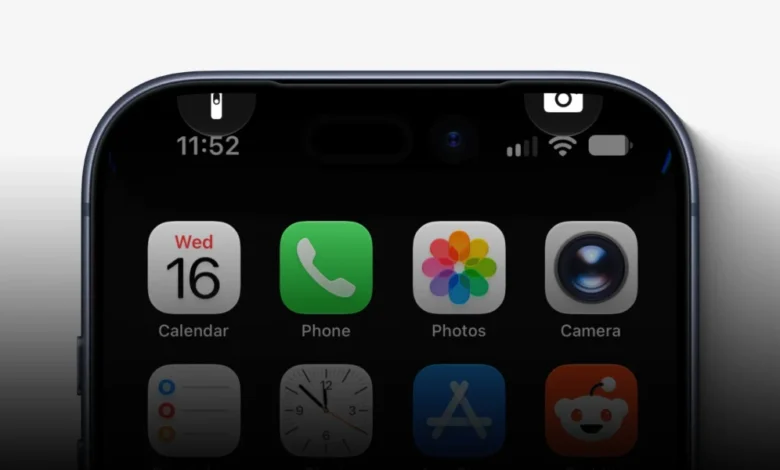
If the timing is executed within the required millisecond window, the device’s UI enters an inconsistent state. The most common manifestations of this glitch include the persistent appearance of the Camera and Torch icons at the top of the Lock Screen, even when the device is supposedly active on the Home Screen. More critically, the system becomes unresponsive to standard navigation gestures. Users report that the Home Screen becomes frozen, preventing swiping between pages, and touch inputs on application icons fail to register. Furthermore, attempts to initiate a standard power-down sequence—typically achieved by holding the side button—are thwarted, as the “Slide to Power Off” UI element becomes inert and unresponsive to touch.
Chronology of the Discovery
The identification of this bug follows a familiar pattern in the history of mobile operating system development. Within 72 hours of the iOS 27 public launch, reports began appearing on forums and social media networks detailing a “frozen” screen phenomenon. Early adopters and technology enthusiasts were the first to document the replication steps, noting that the window of time required to trigger the bug is narrow, often necessitating two or three attempts to successfully induce the soft-lock.
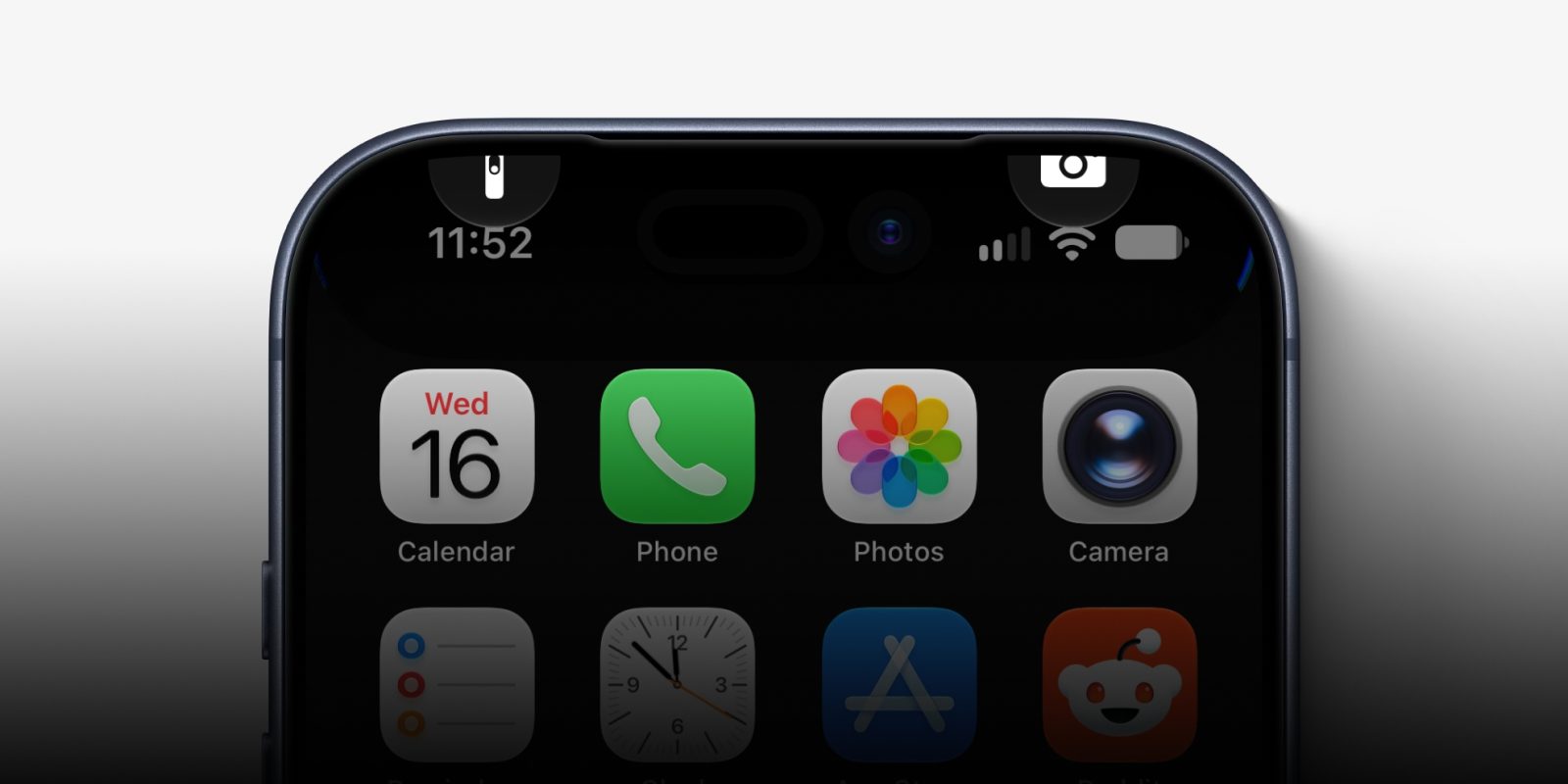
Despite the release of iOS 27.2 in its beta iteration, testers have confirmed that the bug persists across current builds. This indicates that the underlying conflict between the Notification Center and Control Center slide-over animations remains unpatched in the immediate post-launch environment. Apple has not yet issued an official statement regarding a specific fix, though the company’s history with similar UI-layer vulnerabilities suggests that a resolution will likely be included in an upcoming point release or maintenance update.
Contextualizing Software Soft-Locks
This is not the first time iOS has been susceptible to UI-driven lock states. Throughout the evolution of the platform, various sequences of taps, gestures, and even specific character strings in messaging apps have triggered temporary system hangs.
Historically, these bugs often stem from "race conditions" within the SpringBoard—the application responsible for managing the iOS Home Screen. When two system-level animations are triggered simultaneously, the OS may fail to properly transition the display state, leaving the system in a "zombie" mode where the touch input handler is blocked by an invisible or improperly rendered overlay. Because these issues exist at the UI layer rather than the kernel level, the system’s core functionality remains intact, which is why the hardware-level force reboot remains a universal solution.
How to Resolve the Glitch
For users currently affected by this bug, a standard restart is impossible due to the failure of the power-off slider. Instead, users must perform a hardware-level force restart. This process bypasses the operating system’s UI-level shutdown commands and sends a direct signal to the power management integrated circuit.
To perform a force restart on modern iPhone models:

- Quickly press and release the Volume Up button.
- Quickly press and release the Volume Down button.
- Press and hold the Side button until the Apple logo appears on the display.
Once the Apple logo appears, the system will initiate a clean boot cycle, clearing the frozen state and restoring full functionality to the device. Apple has maintained this specific hardware button sequence for several generations of iPhone, ensuring that users have a reliable "fail-safe" when the software layer becomes unresponsive.
Implications for Apple’s Software Quality Assurance
The viral nature of this prank highlights the challenges Apple faces in the era of rapid feature deployment. As iOS continues to add complex, gesture-heavy features to the Home and Lock screens, the surface area for potential UI conflicts expands significantly.
Data from previous software cycles suggests that while these bugs are highly visible, they are often prioritized as "low severity" because they do not involve data loss or unauthorized access. However, the prevalence of such pranks on social media can degrade user perception of system stability. Industry analysts note that Apple’s shift toward a more aggressive annual release cadence for iOS has placed increased pressure on the Quality Assurance (QA) teams to catch edge-case gesture conflicts that might only occur under specific hardware configurations.
Broader Security and Stability Analysis
While this specific incident is being used as a harmless prank, it serves as a reminder of the importance of maintaining an updated system. Software vulnerabilities that cause UI freezes are often patched quietly in subsequent "dot" releases. Security researchers emphasize that users should refrain from attempting to replicate such bugs on devices that contain critical, unsaved data, as the force-reboot process—while standard—is a harsh way to end an active session.
From a development perspective, the issue points to the necessity of improved animation handling in the iOS SpringBoard. If the system were designed to prioritize one gesture over the other, or to cancel the first animation upon the initiation of the second, this specific bug would likely be mitigated. As it stands, the system attempts to process both requests simultaneously, leading to the observed "borked" state.

Conclusion and Future Outlook
As Apple prepares for future iterations of iOS 27, it is expected that the company will address this gesture-timing conflict. In the interim, users are advised to be cautious when sharing their devices with others who might be aware of the "prank."
The situation serves as a practical case study in the complexity of modern mobile OS architecture. Even with extensive beta testing, the sheer variety of user interaction styles ensures that edge cases will occasionally reach the public. While the iOS 27 soft-lock is merely a nuisance, it underscores the importance of the force-restart protocol as a fundamental skill for any smartphone user. As of this report, no permanent damage has been documented, and the bug remains a software-level curiosity rather than a threat to the integrity of the iPhone platform. Users awaiting a permanent fix are encouraged to monitor the Software Update section in their iPhone Settings for forthcoming patches.