Mastering Day-2 Operations in OpenShift Virtualization: Ensuring Zero-Downtime Migration and Dynamic Resource Scaling

Enterprise infrastructure management has long faced a distinct operational divide between initial deployment and long-term maintenance. While Day-1 activities—encompassing architectural design, operator installations, storage class configurations, and initial virtual machine provisioning—lay the foundational groundwork, Day-2 operations represent the true test of engineering resilience. Within production-grade enterprise clusters, the operational reality demands continuous maintenance: worker nodes require systematic draining for kernel upgrades, unexpected hardware failures occur without warning, and business workloads necessitate real-time CPU and RAM adjustments to meet fluctuating demands without incurring service downtime.
Historically, organizations migrating from legacy hypervisors to container-centric platforms treated virtual machines as ephemeral entities akin to standard application containers. Terminating a virtual machine abruptly during routine node maintenance, however, guarantees an unexpected service outage, violating enterprise service-level agreements (SLAs). Addressing this critical operational requirement, the final installment of the OpenShift Virtualization (CNV) technical series focuses on robust Day-2 operations, detailing live migration architectures, eviction strategies, resource hotplugging capabilities, and comprehensive troubleshooting frameworks.
Architecture and Mechanics of Live Migration Under the Hood
The capability to transfer the running state of a virtual machine from one worker node to another with near-zero service interruption is a cornerstone of modern cloud-native virtualization. In standard Kubernetes scheduling paradigms, workloads are static or restarted upon failure. Container-native virtualization, however, bridges legacy stateful expectations with modern orchestrator reliability.
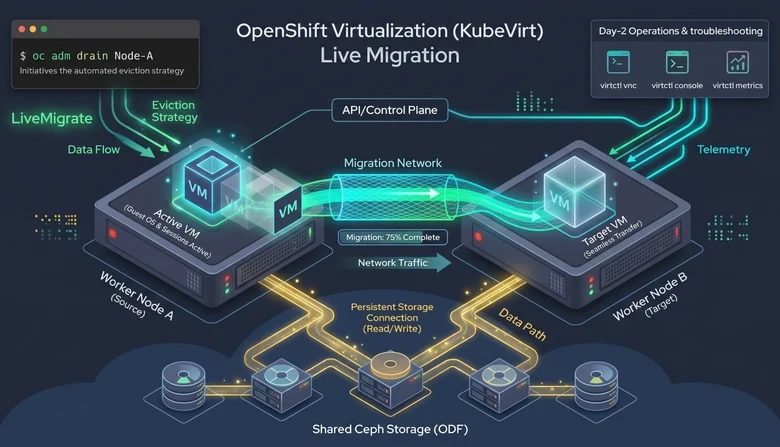
The mechanics of live migration in OpenShift Virtualization involve a synchronized multi-stage process managed by KubeVirt. Initially, memory pages and device states are iteratively copied from the source node to the target node while the virtual machine continues to execute and process incoming transactions on the source host. As the delta—the rate of memory change—decreases, the virtual machine is momentarily paused, final memory states and CPU registers are synchronized to the destination node, and execution resumes seamlessly on the new hardware. Throughout this sequence, persistent storage remains continuously attached via shared enterprise storage backends, ensuring data integrity across the transition.
Implementing Zero-Downtime Eviction Strategies
To prevent Kubernetes from treating virtual machines as standard pods subject to standard termination signals during node drains, administrators must configure explicit eviction behavior. By default, when an operator executes a node drain, the orchestrator issues a SIGTERM signal to pods, effectively terminating the workload and attempting recreation elsewhere.
To override this default behavior and mandate live migration instead of termination, system administrators must declare the evictionStrategy parameter directly within the VirtualMachine resource manifest.
apiVersion: kubevirt.io/v1
kind: VirtualMachine
metadata:
  name: enterprise-workload-vm
  namespace: vm-workloads
spec:
  running: true
  template:
    spec:
      evictionStrategy: LiveMigrate  # Essential for zero-downtime drain
      domain:
        resources:
          requests:
            memory: 8Gi
            cpu: 4
      volumes:
        - name: rootdisk
          persistentVolumeClaim:
            claimName: odf-shared-disk-pvc
Implementing this configuration ensures that when infrastructure maintenance occurs, the control plane orchestrates a graceful transition rather than a disruptive restart.
Orchestrating and Tracking Migrations via CLI and Cluster Management
Executing and monitoring migrations can be performed either manually through specialized tooling or automatically during scheduled node maintenance windows. When an administrator identifies a heavily loaded node requiring relief, migrations can be initiated directly using the virtctl command-line utility:
virtctl migrate enterprise-workload-vm -n vm-workloadsIn scenarios involving broader cluster maintenance, such as rolling out operating system updates across physical hypervisors or replacing faulty server blades, administrators utilize standard OpenShift administrative commands to drain target worker nodes:
oc adm drain <worker-node-name>
  --delete-emptydir-data
  --ignore-daemonsets
  --force
When this command is executed, OpenShift automatically detects all virtual machines configured with the LiveMigrate eviction strategy. The cluster control plane systematically queues and executes live migrations for each affected virtual machine, waiting for every instance to report successful migration before officially cordoning and draining the target node.
To maintain operational visibility during these transitions, KubeVirt utilizes a custom resource known as the VirtualMachineInstanceMigration (VMIM). Administrators can track migration progress in real time by observing the resource status:

oc get vmim -n vm-workloads -wThe migration lifecycle progresses through distinct, verifiable phases: Scheduling, TargetWaitingForVolumeBinding, Running, and finally, Succeeded.
Dynamic Compute Hotplugging: Scaling vCPU and Memory On-the-Fly
Enterprise workloads frequently experience unpredictable demand spikes. Traditionally, scaling compute resources for virtualized environments required scheduling maintenance windows, shutting down the guest operating system, modifying resource allocations, and rebooting the instance. OpenShift Virtualization eliminates this friction by supporting the dynamic hotplugging of virtual CPU (vCPU) and memory (RAM) resources on actively running virtual machines.
Administrators can scale vCPU resources dynamically by patching the virtual machine specification:
oc patch vm enterprise-workload-vm -n vm-workloads --type='json'
  -p='["op": "replace", "path": "/spec/template/spec/domain/cpu/sockets", "value": 4]'
Similarly, memory allocations can be scaled upward while the operating system continues to run production services:
oc patch vm enterprise-workload-vm -n vm-workloads --type='json'
  -p='["op": "replace", "path": "/spec/template/spec/domain/resources/requests/memory", "value": "16Gi"]'
Upon applying these patches, systems engineers can verify the immediate integration of the new resources directly within the guest operating system using diagnostic utilities such as htop or lscpu, confirming that resource expansion occurs with zero disruption to end-user traffic.
Production Troubleshooting and Operational Runbooks
Even within robust, highly available container-native infrastructure, complex edge cases can occasionally disrupt operations. Enterprise engineering teams must be equipped with standardized troubleshooting runbooks to address common failure modes swiftly.
When a virtual machine becomes stuck in a Scheduling or CrashLoopBackOff state, it typically indicates underlying resource exhaustion, storage binding failures, or invalid hardware profile requests. Engineers should immediately inspect the underlying launcher pod and virtual machine instance conditions:
oc describe pod virt-launcher-<vm-name>-xxxxx -n <namespace>
oc get vmi <vm-name> -n <namespace> -o yaml | grep -A 10 conditions
If a live migration fails or aborts prematurely, common causes include insufficient memory bandwidth on the target node, storage backend contention, or network latency spikes that exceed migration sync thresholds. Reviewing the cluster events and migration controller logs provides granular insight into the root cause, allowing operators to adjust migration timeouts or throttle dirty-page rates.
In scenarios where network misconfigurations, firewall rule changes, or operating system kernel panics break standard SSH connectivity, administrators are not left blind. OpenShift Virtualization provides out-of-band console access directly through KubeVirt subresources, ensuring administrative control can always be established:
# 1. Access the text-based serial console:
virtctl console <vm-name> -n <namespace>

# 2. Access a direct graphical VNC session:
virtctl vnc <vm-name> -n <namespace>
Implications for Enterprise Infrastructure Architecture
The maturation of container-native virtualization represents a paradigm shift in how organizations conceptualize enterprise IT infrastructure. By unifying legacy virtual machines and modern cloud-native container workloads under a single control plane, platforms like OpenShift Virtualization dismantle long-standing operational silos. Organizations no longer require fragmented teams, disparate networking configurations, or separate hypervisor licensing agreements to maintain mission-critical applications.
As enterprises continue modernizing their digital estates, mastering Day-2 operational capabilities—such as live migration, dynamic resource hotplugging, and automated node maintenance—ensures that infrastructure teams can deliver the agility and reliability demanded by today’s digital economy.