Pumpkin Lights brings interactive Halloween-themed utility to the macOS menu bar

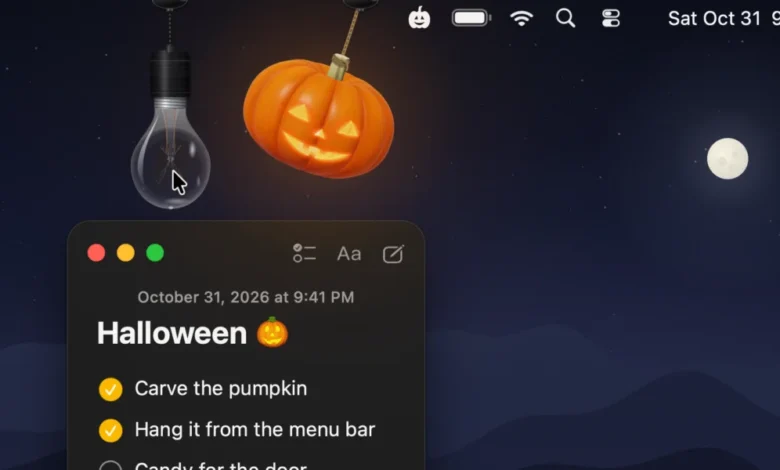
As the autumn season reaches its peak, developers are increasingly turning toward thematic, highly interactive software utilities to enhance the desktop experience. The latest entry into this niche is Pumpkin Lights, a free menu bar application for macOS that transforms the mundane task of toggling system display modes into a physics-based, 3D-rendered event. This application serves as the latest installment in the growing trend of “desk-toy” utilities, which prioritize tactile, delightful user interfaces over strictly utilitarian design.
The Mechanics of Desktop Personalization
Pumpkin Lights functions primarily as a system toggle. By clicking or pulling on a ray-traced jack-o-lantern that dangles from the macOS menu bar, users can trigger a shift between Light and Dark Mode. While the application is visually festive, its technical architecture is sophisticated; it utilizes real-time ray tracing to render the pumpkin’s surface, shadows, and internal glow. Unlike static icons or standard dropdown menus, the app incorporates a physics engine that allows the pumpkin—or an alternative hanging light bulb—to swing, spin, and react to cursor input.
Beyond its default function of changing display settings, the application is highly configurable. Users can map the interaction to a variety of secondary tasks, including launching specific applications or websites, executing shell commands, or triggering custom Shortcuts. Additional features include an “awake” toggle to prevent system sleep, a mute command for system audio, and a variety of visual customization options, such as four distinct color variants and customizable hanging cord aesthetics.
Contextualizing the Rise of Indie Desktop Utilities
The release of Pumpkin Lights follows a broader industry shift toward "digital gardening" and desktop personalization. In recent years, Apple’s macOS ecosystem has seen a resurgence of indie developers creating small, specialized tools that add personality to the operating system. This trend is often traced back to the "widgets" movement and the popularity of desktop customization tools like Festivitas, a similar holiday-themed menu bar utility that gained popularity in late 2024.
For many developers, the goal is to bridge the gap between "cold" software interfaces and human interaction. The creator of Pumpkin Lights noted that the project was born out of a desire to make system settings feel tangible. "The idea came from something most of us do every day without thinking: switching between Light and Dark Mode," the developer stated. "It’s always a toggle buried in Control Center or System Settings, and it never feels like anything. I wanted it to feel like touching a real object."

Timeline of Desktop Utility Evolution
The evolution of these "delight-first" utilities can be categorized into three distinct phases:
- The Utility Phase (Pre-2020): During this period, macOS menu bar apps were primarily functional, focusing on system monitoring, clipboard management, or file compression. The aesthetic was almost exclusively utilitarian, following Apple’s Human Interface Guidelines strictly.
- The Widget Integration Phase (2020–2023): With the introduction of macOS Big Sur and the subsequent update to the WidgetKit framework, developers began experimenting with visual consistency. This saw the rise of apps that looked like native extensions of the operating system.
- The Interactive Desk-Toy Phase (2024–Present): The current era, exemplified by tools like Pumpkin Lights, focuses on physics engines and 3D rendering. These apps are designed to be "played with" rather than just "used," signaling a shift toward human-centric design in the indie development space.
Technical Specifications and System Compatibility
Pumpkin Lights is built to leverage modern macOS hardware, specifically targeting systems running macOS 14 (Sonoma) or later. By utilizing the Metal graphics API and advanced rendering techniques, the app ensures that the ray-traced lighting effects do not create a significant drain on CPU or GPU resources.
The application architecture is lightweight, designed to remain resident in the menu bar without impacting background performance. This is a critical factor for professional users who might be concerned about "bloatware" impacting system stability. Because the app is open-ended—allowing users to run custom commands or Shortcuts—it effectively functions as a programmable interface that is both decorative and functional.
The Broader Impact on macOS UI Design
The popularity of apps like Pumpkin Lights provides insight into the changing expectations of the modern power user. While Apple maintains a strict design language, the appetite for customization remains insatiable. By allowing users to inject personality into their menu bars, indie developers are filling a void left by the operating system’s standardized appearance.
Furthermore, these applications demonstrate the power of the Apple ecosystem’s current development tools. The fact that an independent developer can implement real-time 3D ray tracing within a menu bar application speaks to the maturity of frameworks like SwiftUI and the underlying performance of Apple Silicon. These tools have democratized high-fidelity visual design, allowing developers to create "delightful" software that would have required significantly more engineering effort a decade ago.
Implications for Future Software Development
The success of such utilities suggests a shift in how software success is measured. Traditionally, user retention was tied to feature density—how many things an app could do. Today, developers are finding success through "micro-interactions." By turning a simple system toggle into a tactile experience, the app increases the frequency of user engagement.

If this trend continues, we may see Apple integrating more "physics-based" UI elements into native macOS updates. Historically, Apple has adopted successful ideas from the jailbreak and indie community, such as Control Center, system-wide dark mode, and desktop widgets. Should the "desk-toy" aesthetic continue to gain traction, it is plausible that future macOS iterations may offer more native options for interactive menu bar elements.
Security and Ethical Considerations
As with any third-party utility that interacts with system settings, security is a paramount concern for enterprise and privacy-conscious users. Pumpkin Lights is distributed via the developer’s website. Users who choose to install such utilities should be aware of the permissions required, particularly for apps that request access to execute shell commands or run system-level Shortcuts.
The developer has maintained transparency by offering the tool as a free utility, which fosters community trust. However, as the ecosystem of indie apps grows, industry analysts suggest that users should prioritize apps that offer clear, concise privacy policies and minimal permission requests.
Conclusion and Availability
Pumpkin Lights serves as a prime example of the creative potential within the independent macOS development community. By focusing on the intersection of playfulness and functionality, it provides a unique way for users to engage with their computers during the Halloween season.
The application is currently available for download on the developer’s official website. It remains a testament to the fact that even the most routine tasks—like switching between Light and Dark mode—can be transformed into something engaging when viewed through the lens of creative, indie software design. As the digital workspace continues to evolve, tools that emphasize "delight" will likely remain a staple of the desktop experience, proving that even in a professional environment, there is always room for a bit of seasonal fun.