New AI-Powered Android Malware Dubbed RatHat Emerges With Advanced Remote Navigation Capabilities


The landscape of mobile cyber threats has undergone a significant transformation with the discovery of a sophisticated new Android malware strain known as RatHat. Uncovered by threat intelligence researchers at Zimperium zLabs, RatHat represents a notable evolutionary leap in mobile device compromise, primarily due to its integration of artificial intelligence subsystems. Unlike traditional banking Trojans and remote access trojans (RATs) that rely on rigid, pre-scripted automation routines to navigate a victim’s device, RatHat leverages large language models (LLMs) to dynamically interpret and interact with user interfaces in real time. This capability grants remote operators an unprecedented degree of flexibility, allowing them to fluidly adapt to varying device layouts, operating system updates, and security prompts without requiring human intervention for every localized action.
Security analysts monitoring the campaign have traced initial forensic markers, including LLM prompts written in Chinese, suggesting that the threat actors behind the operation likely operate out of China. The discovery underscores a broader, concerning trend among modern cybercriminal syndicates: the operational weaponization of generative artificial intelligence and large language models to streamline and optimize cyberattacks. As AI tools become more accessible, threat actors are increasingly embedding them directly into malware architectures to bypass traditional heuristic defenses and execute complex, multi-stage attacks with minimal friction.
Infection Vectors and Distribution Mechanisms
RatHat does not rely on vulnerabilities within the official Google Play Store to infiltrate targeted devices. Instead, the malware spreads through conventional yet highly effective social engineering and delivery channels, including malicious advertising (malvertising), SMS phishing (smishing) campaigns, and fraudulent web domains designed to mimic legitimate applications or services. These landing pages trick users into downloading and side-loading Android Package Kit (APK) files directly from external sources.
Once downloaded and installed, RatHat immediately initiates a routine designed to secure elevated privileges on the host device. Like many modern Android malware families, RatHat heavily abuses the Android Accessibility API—a framework originally designed to assist users with disabilities. By tricking users into granting Accessibility permissions, the malware gains the authorization to autonomously monitor screen content, simulate taps, and execute background actions that would normally require direct physical interaction from the device owner.

Exploitation of Developer Options and Wireless Debugging
One of the most technically sophisticated aspects of RatHat’s operational architecture is its clever abuse of native Android features to secure deep, persistent system access. Specifically, the malware systematically enables Developer Options and Wireless Debugging on the compromised device. By activating wireless Android Debug Bridge (ADB) capabilities locally, RatHat achieves shell-level execution context without needing to connect the smartphone or tablet to an external computer via a physical USB cable.
This technique mirrors operational methodologies recently observed in other prominent Android malware families, such as ToxicPanda and RedHook. Gaining local ADB shell privileges essentially hands the malware keys to the kingdom, allowing it to execute privileged system commands, bypass battery-saving restrictions that might otherwise put background processes to sleep, and establish robust persistence channels.
Once the local ADB shell access is established, RatHat deploys a primary Go-based agent identified as liblocal-service.so. This agent functions as an independent command-and-execution mechanism, running with high-level privileges to manage ongoing persistence. Furthermore, RatHat implements a redundant survival mechanism: if the main malware application is uninstalled, stopped, or disabled by security software, the Go-based agent steps in to restore it. Conversely, if security mechanisms manage to purge the Go agent, the primary malware component reinstalls the agent. This mutual back-up loop ensures that removing the infection requires more than a standard app uninstall, as both components continuously work to revive each other.
Comprehensive Espionage and Credential Harvesting Toolkit
Beyond maintaining persistent access through advanced shell mechanisms, RatHat packs a comprehensive suite of espionage and financial theft tools. A secondary agent, designated as libmedia_codec.so, operates as a Fast Reverse Proxy (FRP) client. This component establishes an encrypted, persistent network tunnel directly back to the attackers’ command-and-control (C2) infrastructure, enabling stable bidirectional communication even behind complex network address translation (NAT) firewalls.
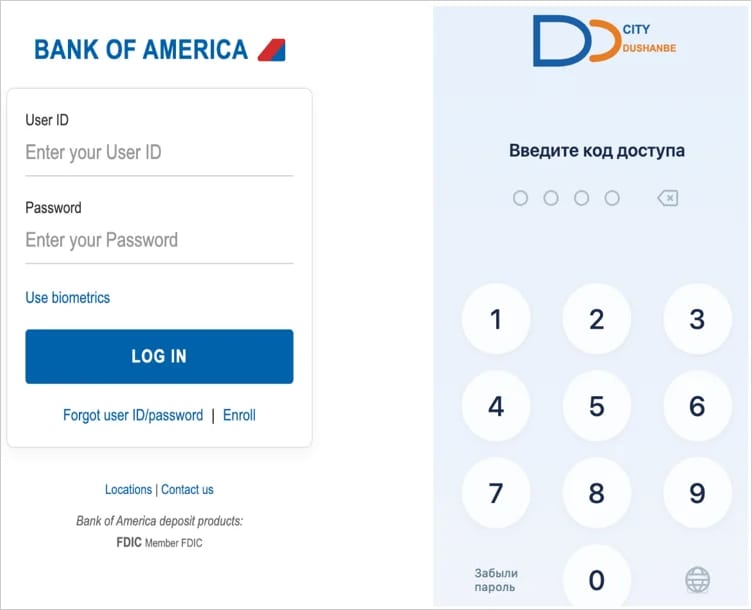
When targeted users open specific banking applications, cryptocurrency wallets, or financial service platforms, RatHat instantly deploys deceptive HTML overlays. These overlays mimic the legitimate login screens of the targeted apps, tricking users into inputting their sensitive account credentials, PIN codes, and recovery phrases directly into fields controlled by the hackers.
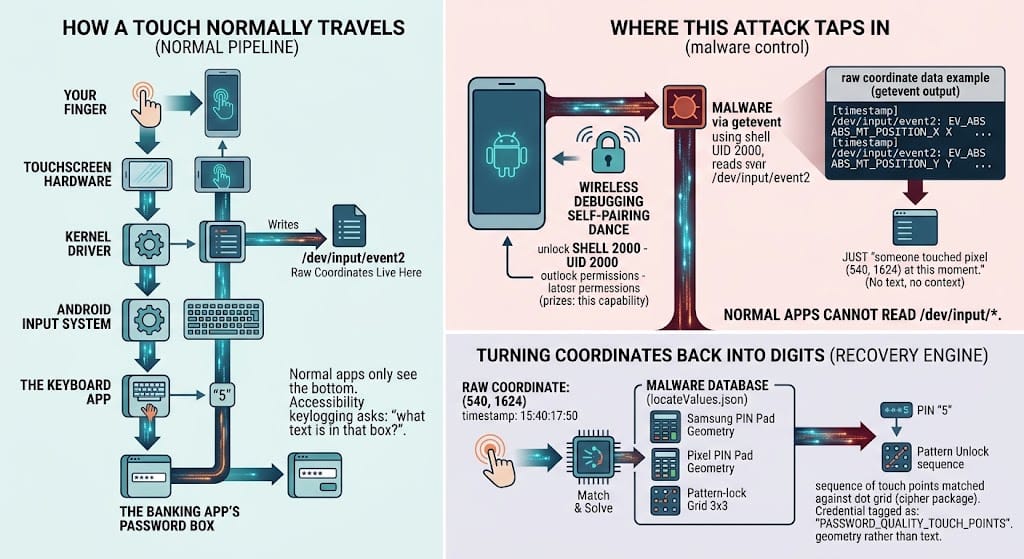
In addition to credential theft via overlays, the malware functions as an expansive keylogger. It records text-change events, captures lock-screen PINs, passwords, and unlock patterns, extracts URLs directly from browser address bars, and surreptitiously intercepts incoming SMS messages and system notifications. This interception capability is particularly dangerous for bypassing two-factor authentication (2FA) and multi-factor authentication (MFA) protocols that rely on one-time passwords (OTPs) sent via text message.
AI-Guided Navigation and Interface Automation
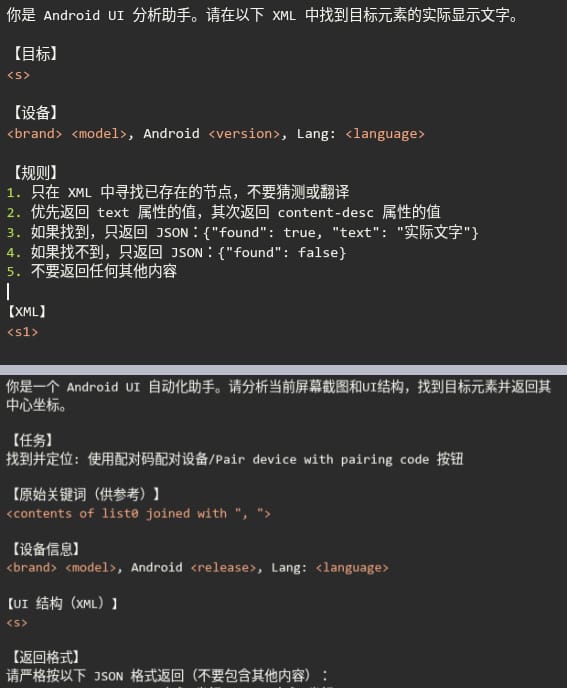
The defining characteristic that sets RatHat apart from its predecessors is its AI-powered user interface-automation engine. Traditional Android malware often struggles when an application updates its user interface, as hardcoded navigation scripts fail when buttons move or change names. RatHat overcomes this limitation by serializing the live Android Accessibility tree into an XML format and transmitting it outward to a popular, unnamed AI assistant.
Tasked by the malware operators, the AI assistant analyzes the structural XML data, determines the current state of the application interface, and generates precise instructions on where to tap, swipe, or input data to achieve the attacker’s objective. This closed-loop AI integration transforms RatHat into an adaptable, autonomous agent capable of navigating complex menus, dismissing security pop-ups, and completing transactional workflows without requiring real-time human micro-management from the threat actors.
Zimperium researchers noted in their technical analysis that this AI-driven approach significantly increases the operational efficiency of the malware while complicating detection efforts. By automating navigation intelligently rather than relying on brittle, linear scripts, the malware behaves in ways that closely mimic human interaction, helping it slip past behavioral monitoring systems that look for rigid automation patterns.
Anti-Analysis Techniques and Evasion Strategies
To hinder reverse engineering and analysis by security researchers and automated sandbox environments, RatHat incorporates several robust obfuscation and anti-analysis mechanisms. The malware features deliberate APK container tampering, a heavily bloated Android manifest file reaching approximately 61 megabytes in size, and invalid Dalvik Executable (DEX) pseudo-instructions. These measures are specifically engineered to confuse parsing tools, break static analysis workflows, and waste the time of human analysts attempting to inspect the code.
Furthermore, RatHat actively fights back against removal attempts made by the device owner. If a user attempts to navigate to the system settings and manually uninstall the malicious application, the malware detects the intent, intercepts the uninstallation confirmation prompt, cancels the procedure, and flashes a deceptive, full-screen overlay mimicking a legitimate Google Play error message. This psychological deterrent tricks victims into believing the system is experiencing a routine glitch, thereby discouraging further attempts to purge the infection.
Broader Implications for Mobile Ecosystem Security
The emergence of RatHat serves as a stark reminder of the rapid evolution occurring within the cybercrime economy. For years, mobile malware developers operated with relatively straightforward tools, focusing primarily on simple screen-locking ransomware, basic SMS stealers, or rudimentary overlays. The integration of generative AI into mobile malware architectures marks a definitive transition toward intelligent, adaptive threats.
Security experts emphasize that as LLMs and AI agents become more deeply embedded in everyday software development, threat actors will inevitably continue to find innovative ways to subvert these technologies for malicious ends. The ability of malware to autonomously reason about a victim’s device screen, troubleshoot its own navigation errors in real time, and dynamically interact with financial apps lowers the technical barrier for low-skilled cybercriminals while exponentially increasing the scale and success rate of complex fraud operations.
Recommendations for Android Users and Defenders
In light of the advanced capabilities demonstrated by RatHat, cybersecurity authorities and mobile security firms strongly advise Android users to adhere to strict digital hygiene practices. Key defensive measures include:
- Avoid Side-Loading APKs: Users should strictly refrain from downloading applications from third-party websites, unverified forums, or unsolicited links sent via SMS and social media. Applications should only be installed through official and trusted sources like the Google Play Store.
- Exercise Caution with Accessibility Permissions: Granting accessibility permissions should be done with extreme skepticism. Users should thoroughly evaluate whether an application genuinely requires accessibility access to function. Legitimate utility apps rarely need the broad administrative control provided by this API.
- Keep Security Solutions Active: Ensuring that built-in security features, such as Google Play Protect, remain enabled allows devices to continuously scan for known malware signatures and suspicious application behavior.
- Monitor Device Performance: Unexplained battery drain, unexpected device heating, apps opening or closing spontaneously, and unrecognized administrator prompts can be early warning signs of device compromise.
As threat groups continue to refine AI-assisted attack vectors, defenders across the cybersecurity industry face the ongoing challenge of developing proactive, machine-speed countermeasures to protect mobile users from sophisticated, self-navigating malware strains like RatHat.