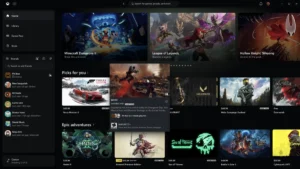
Microsoft Rolls Out Major Performance Overhaul and UI Redesign for the Xbox PC App to Win Back Desktop Gamers


Microsoft has officially initiated a comprehensive performance overhaul and user interface redesign for the Xbox app on Windows, aiming to address years of persistent user complaints regarding sluggishness, poor navigation, and general instability. Rolling out first to members of the Xbox Insiders program, the update represents a significant structural push by the technology giant to make its desktop gaming ecosystem faster, more intuitive, and competitive against dominant storefronts like Valve’s Steam and the Epic Games Store.
According to official metrics released via Xbox Wire, the newly optimized desktop client boasts drastic performance enhancements across the board. Cold-boot times have allegedly been slashed by up to 60 percent, while the loading speeds of various sub-pages have been accelerated by up to 50 percent. Furthermore, internal application windows and pop-ups open up to 65 percent faster. While Microsoft acknowledges that these performance metrics will inevitably vary depending on individual user hardware, background tasks, and internet bandwidth, early feedback from the Insider community indicates a noticeably snappier experience.
Beyond raw speed, the core layout of the application has undergone a substantial pruning. Navigation bars have been streamlined, social features—such as party chats, friend lists, and direct messaging—have been integrated more prominently into the primary menus to facilitate quicker social engagement, and advanced filtering tools have been introduced to help users manage growing digital libraries. The aesthetic presentation has also been refreshed, incorporating smoother animations, cleaner game cards, and the long-awaited addition of dedicated light and dark display modes.
A Chronic History of Desktop Friction
To understand the weight of this current update, one must examine the rocky trajectory of Microsoft’s PC gaming initiatives. For decades, the corporation struggled to establish a cohesive and appealing ecosystem for personal computer gamers. Historically, PC gaming under the Windows banner was fragmented, often plagued by poorly optimized software, intrusive digital rights management (DRM) protocols, and the maligned Windows Marketplace for Games during the Windows Vista era.
When Microsoft launched the modern Xbox app for Windows to accompany the rollout of Xbox Game Pass for PC, it was initially viewed as a clumsy interface built on top of the Universal Windows Platform (UWP). Users frequently reported synchronization bugs, excruciatingly slow download speeds, difficulty accessing game files, and an overall lack of the granular control that PC gamers had grown accustomed to on legacy platforms like Steam.
Even as Xbox Game Pass exploded in popularity—becoming a cornerstone of Microsoft’s subscription-driven gaming strategy—criticism of the desktop application remained a constant thorn in the company’s side. Gamers frequently subscribed to the service for its immense library value, only to express frustration with the software wrapper required to download and launch the titles. Recognizing that software friction was a barrier to long-term retention, Microsoft leadership quietly authorized a multi-year engineering effort to completely rebuild the application’s underlying architecture.
Chronology of Recent Ecosystem Shifts
The rollout of the new Xbox PC app does not exist in a vacuum; it is part of a broader, aggressive campaign by Microsoft to unify its gaming footprint across consoles, personal computers, web browsers, and smart devices.
Earlier this year, Microsoft took historic steps to bridge its console legacy with the PC ecosystem. In a move that surprised long-time industry watchers, the corporation began bringing select classic titles from the original Xbox and Xbox 360 eras to PC platforms for the very first time. Nostalgia-driven releases such as Blinx: The Time Sweeper, Conker: Live and Reloaded, Crimson Skies: High Road to Revenge, and Fuzion Frenzy opened the floodgates for retro enthusiasts on desktop hardware.

Concurrently, Microsoft addressed long-standing social and achievement disparities by launching Mythic Achievements—an equivalent to PlayStation’s coveted Platinum Trophies—across its entire ecosystem. This gave completionists a unified, cross-platform metric to showcase their dedication.
Following these software milestones, the focus pivoted squarely to cloud infrastructure and desktop optimization. Over the last several months, Microsoft expanded its revamped cloud gaming architecture, allowing users to stream titles directly through web browsers on a wider array of devices, including supported smart televisions and virtual reality (VR) headsets. The current Insider flighting of the desktop app serves as the culmination of these engineering streams, bringing faster local client performance together with seamless cloud and web integration.
Official Statements and Industry Reception
Asha Sharma, CEO and corporate vice president overseeing elements of the Xbox ecosystem, addressed the update publicly via social media platform X (formerly Twitter). Sharma characterized the redesign as "a meaningful improvement" for the platform, yet candidly conceded that the journey is far from complete. "There’s still plenty more to do," Sharma noted, signaling to the community that Microsoft views this performance patch as a foundational stepping stone rather than the final destination for the Windows app.
Industry analysts have largely echoed this sentiment. While the performance metrics—such as a 60 percent reduction in boot times—are undeniably impressive on paper, market observers point out that technical parity with competitors is only half the battle. Steam has cultivated a deeply entrenched community over nearly two decades, anchored by robust user-generated reviews, workshop support, community forums, and a tightly integrated social marketplace.
For Microsoft to truly capture the hearts and minds of dedicated PC gamers, the Xbox app must evolve beyond a mere delivery mechanism for Game Pass subscriptions and establish itself as a vibrant, feature-rich community hub in its own right.
Broader Implications and the Future of Windows Gaming
The implications of a faster, more reliable Xbox PC app extend far beyond mere user convenience; they touch upon Microsoft’s grander vision for hardware-agnostic gaming. As the boundaries between consoles, PCs, and mobile devices continue to blur, the Windows operating system remains the ultimate battleground for digital distribution.
By optimizing the client, Microsoft removes one of the final friction points keeping PC-first players from fully engaging with the Xbox ecosystem. A faster app translates directly into higher user retention, fewer support tickets, and a more favorable environment for third-party publishers selling games on the Windows Store. Furthermore, as the company pushes deeper into cloud streaming via browsers and smart devices, maintaining a lightweight, responsive desktop anchor ensures that players moving between local hardware and cloud sessions experience zero cognitive load.
As the updated app transitions out of the Xbox Insider phase and rolls out to the general public in the coming weeks, millions of Windows users will soon put these performance claims to the test. Whether these structural upgrades are enough to shift consumer habits away from established heavyweights remains to be seen, but Microsoft has firmly signaled that it is no longer willing to let software sluggishness hold its PC ambitions back.