Meta Prepares Next-Gen Hardware Lineup as HorizonOS Leak Sheds Light on Phoenix Mixed Reality Headset

While current consumer attention heavily focuses on Meta Platforms’ surging popularity with artificial intelligence-enabled smart glasses, the tech giant’s long-term vision for the metaverse and virtual reality remains firmly active behind closed doors. Recent leaks from firmware packages within the company’s operating ecosystem have inadvertently offered a first glimpse into hardware that could define the next generation of spatial computing. Although Mark Zuckerberg’s enterprise has pivoted substantial public relations and research capital toward everyday wearable technology, internal development cycles continue to advance immersive headsets, augmented reality (AR) displays, and mixed reality (MR) devices.
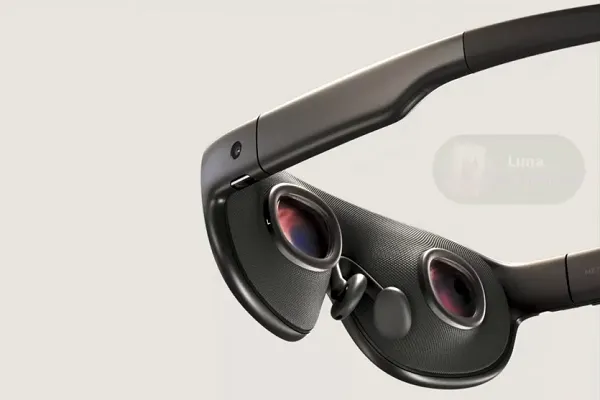
The disclosure originated from virtual reality researcher @Lunayian, who uncovered and shared a short promotional video embedded deep within the HorizonOS Prescription Lens firmware package. According to specialized industry reporting from outlets such as Road to VR, the leaked asset showcases an unreleased device internally designated as Meta Phoenix. This mixed reality unit is believed to be one of several distinct hardware iterations currently progressing through Meta’s Reality Labs division, signaling that the company views standalone virtual and mixed reality headsets as a vital, evolving counterpart to lightweight smart glasses.
The Evolving Hardware Ecosystem at Reality Labs
Meta’s hardware roadmap has grown increasingly diversified as the company attempts to capture multiple form factors in the consumer technology market. Rather than relying solely on a single device category, the corporation is cultivating a multi-pronged approach that spans audio-enabled smart glasses, heads-up display glasses, and fully immersive headsets.
Among the most publicized projects running concurrently with the Phoenix headset are the anticipated Meta Hypernova AI glasses. Designed to serve as a natural evolution of Meta’s existing AI-powered smart eyewear, the Hypernova line aims to introduce more advanced visual feedback mechanisms while maintaining a standard, lightweight glasses footprint. Additionally, the company continues development on the Meta Aria AR device initiative. Characterized by its robust, feature-dense black frames, the Aria line serves primarily as a research and development testbed packed with sensor arrays, cameras, and processing units necessary to map spatial environments and train foundational AI models.
The newly surfaced Phoenix device, however, appears positioned to succeed current iterations of the standalone Quest virtual reality headset family. By incorporating advanced mixed reality pass-through capabilities alongside deep artificial intelligence integration, Phoenix represents Meta’s ongoing commitment to high-end spatial computing. Industry observers note that while public sentiment and corporate messaging temporarily shifted away from the term "metaverse" in favor of generative AI branding, the underlying engineering resources dedicated to immersive virtual environments have not decelerated.
Chronology of Meta’s Hardware Evolution
To understand the strategic significance of the Phoenix leak, it is necessary to examine the timeline of Meta’s hardware releases and strategic pivots over recent years:
- 2020–2021: Meta launches the Quest 2, driving mainstream adoption of standalone virtual reality and formally rebranding its corporate parent entity from Facebook to Meta to emphasize its long-term metaverse strategy.
- 2022: The company introduces Project Aria research glasses to the public sphere, gathering real-world data to support spatial computing algorithms, followed by the high-end launch of the Meta Quest Pro enterprise headset.
- Late 2023: Meta releases the Quest 3, introducing high-fidelity color pass-through mixed reality to the consumer market at an accessible price point, alongside the debut of the first-generation Ray-Ban Meta AI smart glasses.
- 2024: Sales of AI-powered smart glasses exceed initial internal projections, establishing wearables as a viable commercial category. Simultaneously, regulatory scrutiny intensifies over privacy concerns related to recording capabilities.
- Late 2025 (Projected): Firmware leaks, such as the HorizonOS Prescription Lens package discovery, expose early digital assets of next-generation hardware including the Phoenix mixed reality headset.
- Upcoming Meta Connect Showcase: Industry analysts anticipate formal updates, technical previews, or roadmap clarifications regarding Meta’s AR and VR portfolios during the annual developer conference.
Regulatory Challenges and Consumer Privacy Hurdles
Despite the technological promise exhibited by hardware leaks like the Phoenix headset and the commercial momentum behind its AI smart glasses, Meta’s broader hardware strategy faces significant headwinds. The path toward widespread adoption of camera-equipped and sensor-dense wearables is fraught with complex social, legal, and regulatory obstacles.

In recent months, consumer backlash regarding the potential misuse of recording-enabled smart glasses has intensified. Privacy advocates and civil liberties organizations have raised concerns over the ease with which users can capture video and audio in public spaces without explicit consent from bystanders. This negative sentiment has begun to impact brand perception and threatens to slow consumer adoption rates across key demographic segments.
Furthermore, governmental oversight is tightening. Meta’s AI smart glasses have become the subject of formal regulatory investigations in both the United Kingdom and the United States, alongside several European jurisdictions. In response to privacy compliance concerns, certain retail establishments, entertainment venues, and public spaces have enacted outright bans on recording eyewear. These developments may force Meta to implement substantial software or hardware modifications—such as more prominent indicator lights or automated recording restrictions—which could ultimately diminish the user experience and impact overall device sales.
Strategic Implications and Market Outlook
The emergence of the Phoenix headset within system firmware underscores a core reality of the modern consumer technology sector: hardware lifecycles operate years ahead of public product launches. Even as Meta heavily promotes artificial intelligence features and lightweight form factors to capture immediate market share, the company’s long-term bet on spatial computing remains intact.
By embedding AI capabilities directly into its upcoming operating system packages and hardware pipelines, Meta is attempting to create a unified ecosystem where smart glasses, mixed reality headsets, and traditional computing interfaces seamlessly interoperate. The inclusion of advanced sensors and processing units in devices like the Phoenix headset suggests that future spatial computing hardware will rely heavily on localized artificial intelligence models to interpret user intent, manage environmental mapping, and deliver contextual digital overlays.
However, the commercial success of these upcoming devices will depend heavily on how effectively Meta can navigate the mounting regulatory scrutiny surrounding privacy and data collection. Striking the right balance between technological capability and consumer trust will dictate whether next-generation hardware achieves mass-market penetration or remains constrained by compliance mandates and public apprehension.
Further details regarding the company’s hardware pipeline are expected to be unveiled during the upcoming Meta Connect showcase, where executives will likely address both the future of spatial computing and the strategic roadmap for the company’s evolving device ecosystem.