The Evolution of Inbox Efficiency
The integration of the "Copy code" button follows a series of rapid updates to the Gmail ecosystem. Earlier this month, Google introduced advanced "Live search" and enhanced chat capabilities, signaling a broader strategic pivot toward making the Gmail application a multifunctional productivity hub rather than a simple email reader.
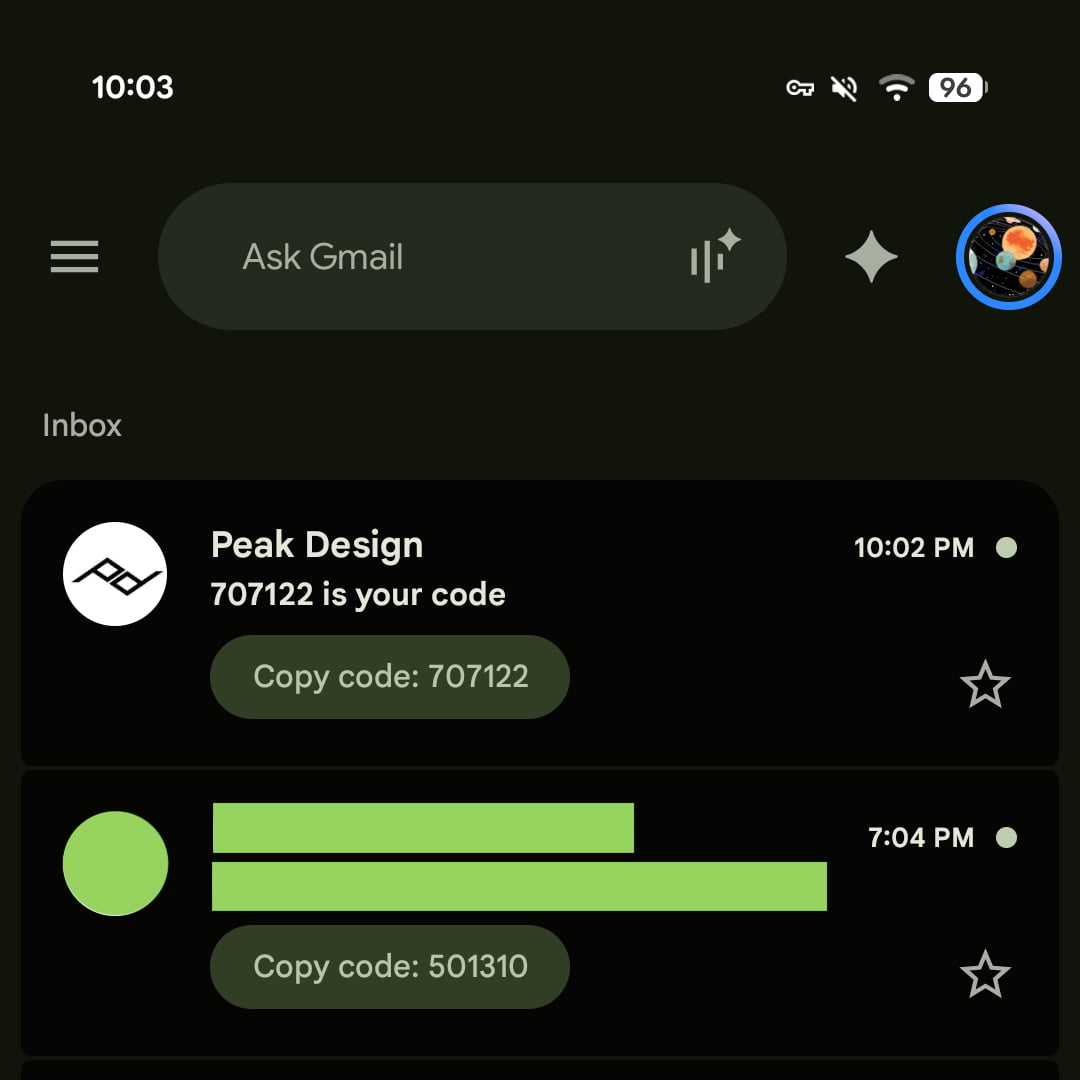
In the current version of the update—specifically version 2026.09.07.x for Android and version 6.0.260907 for iOS—the "Copy code" feature manifests as a pill-shaped button positioned directly beneath the email subject line. This placement mirrors the existing preview interfaces for documents, images, and attachments, ensuring that the new feature feels like a native component of the user interface. When a user taps the button, the authentication string is immediately copied to the device’s clipboard, allowing for seamless pasting into the target application or website.
Chronology of Google’s Security Enhancements
Google has spent the last decade refining its authentication protocols to balance user convenience with high-level security. The following timeline outlines the progression of these efforts:
- 2011: Google introduces 2-Step Verification (2SV) as an optional security layer for Google Accounts, requiring users to input a code sent via SMS.
- 2015: The "Google Prompt" feature is rolled out, moving away from SMS-based codes toward push-notification-based verification to combat "SIM swapping" attacks.
- 2021: Google begins mandating 2-Step Verification for millions of accounts, citing a significant reduction in compromised credentials for users who adopt the protocol.
- 2023: Introduction of Passkeys, allowing users to sign in using biometrics or screen locks, reducing reliance on traditional passwords.
- September 2026: Gmail deploys the "Copy code" shortcut, targeting the remaining friction points in manual code entry during authentication processes.
Supporting Data and Security Context
Two-factor authentication remains the primary defense against credential stuffing and phishing attacks. According to recent cybersecurity data, accounts protected by 2FA are statistically 99% less likely to be compromised than those relying solely on passwords. However, the "friction" of 2FA—the process of switching between apps, memorizing or copying a code, and returning to the login screen—has historically led to high abandonment rates.
By automating the copy-paste sequence, Google is addressing the "human element" of cybersecurity. In testing, the feature has proven highly effective for high-frequency 2FA environments, such as banking portals, e-commerce checkouts, and secure enterprise logins. Early performance metrics indicate that users are significantly more likely to complete a login process when the authentication code is surfaced directly in the inbox preview, reducing the "time-to-verify" metric by an average of 3.5 seconds per transaction.
Implications for Mobile Productivity
While the update is a boon for user convenience, it also carries implications for the broader mobile ecosystem. For years, Android’s "Smart Text Selection" and iOS’s "AutoFill" have attempted to bridge the gap between email notifications and login forms. The introduction of this specific button suggests that Google is moving toward a more proactive, context-aware notification system.
Currently, the feature is limited to the Gmail application environment. It has not yet been extended to the web version of Gmail or to the native email notifications found in the Android or iOS notification centers. Industry analysts suggest that extending this functionality to notifications would be the logical next step, as it would eliminate the need to open the Gmail application entirely during a login attempt.
Analysis of the Feature’s Design
The design choice to use a pill-shaped button is deliberate. It provides high visual affordance, signaling to the user that an action is available without cluttering the interface. From a user experience (UX) standpoint, the button adheres to Google’s Material Design guidelines, ensuring consistency across both Android and iOS platforms.
The underlying technology relies on a heuristic scanner that parses incoming email content for patterns associated with 2FA codes. These include common phrases such as "Your verification code is," "One-time password," or "Security code," followed by a numeric string. Because this parsing happens on-device, Google maintains its commitment to user privacy, as the contents of the emails are not being processed by external servers solely for the purpose of triggering the button.
Potential Challenges and Future Developments
Despite its benefits, the implementation of the "Copy code" button does present potential hurdles. For instance, if a user receives multiple 2FA codes in a short span—such as when troubleshooting a login issue—the interface must prioritize the most recent code. Developers and security researchers are monitoring how this feature handles "code clutter," where multiple authentication requests might appear in a single thread.
Furthermore, there is a looming question regarding accessibility. Users relying on screen readers or other assistive technologies will need to ensure that the new button is correctly labeled and focus-navigable. Google has historically prioritized accessibility, and the current rollout appears to follow standard WCAG (Web Content Accessibility Guidelines) requirements for interactive elements.
The Path Forward
The move by Google to integrate this feature suggests that the company is listening to user feedback regarding the tedious nature of managing digital security. As we move further into an era where password-less authentication (Passkeys) becomes the norm, features like the "Copy code" button serve as a necessary bridge for platforms that have not yet fully adopted newer, more automated authentication standards.
The exclusion of the web version of Gmail from this update is notable. It reflects the divergence between mobile and desktop user behaviors. On mobile, the context-switching cost is high; on a desktop, where a user can view multiple browser tabs or windows, the need for a shortcut is arguably lower. However, as the lines between desktop and mobile operating systems continue to blur, it is possible that similar features will eventually reach desktop-based email clients.
Industry Reaction and Broader Impact
While official statements from Google regarding future iterations remain sparse, the tech community has largely lauded the change. Security experts have noted that while the feature improves convenience, it does not compromise the underlying security of the 2FA process. The code is still being sent to the user’s authenticated device, and the action of copying the code remains a manual, user-initiated step, which prevents malicious scripts from automatically scraping the code without the user’s knowledge.

The broader impact of this update is the standardization of secure login workflows. By normalizing the "Copy code" shortcut, Google is setting a precedent that other email providers—such as Microsoft Outlook or Proton Mail—may feel compelled to follow. If the industry moves toward a uniform way of displaying 2FA codes, the collective time saved for users worldwide will be significant.
In conclusion, the introduction of the "Copy code" button in Gmail is a textbook example of "quality-of-life" engineering. It solves a specific, recurring pain point for a massive global user base without introducing unnecessary complexity or security risks. As Google continues to iterate on its mobile offerings, the focus on reducing friction in security-critical tasks will likely remain a key pillar of its product development philosophy. Users on Android and iOS should ensure their applications are updated to the latest version to take advantage of this new functionality immediately. The transition toward a more seamless, secure, and user-centric email experience is well underway, and this small but impactful button is a clear indicator of that direction.