How to Disable the Touchscreen on the New MacBook Pro with PROLED XDR Display

The arrival of the new MacBook Pro, equipped with the innovative PROLED XDR display, marks a historic pivot for Apple’s professional laptop lineup. For the first time in the company’s history, Apple has integrated touch-sensitive technology directly into the primary display of its flagship notebook. While this addition aims to bridge the gap between iPad-like interactivity and macOS productivity, it has simultaneously introduced a polarizing shift in user interface expectations. Recognizing that not all professional workflows benefit from a tactile screen, Apple has implemented comprehensive software controls allowing users to disable the feature entirely or fine-tune its sensitivity.
The Evolution of Apple’s Display Strategy
For over a decade, Apple executives, including the late Steve Jobs, publicly resisted the notion of a touchscreen Mac. The prevailing argument maintained that touch interfaces on a vertical display were ergonomically unsound, leading to what Apple famously termed "gorilla arm" syndrome. However, the introduction of the PROLED XDR display represents a technological breakthrough that addresses previous thermal and structural concerns. By utilizing advanced organic light-emitting diode technology integrated into a high-dynamic-range architecture, the screen is thinner, more resilient, and more responsive than any previous Apple display.
The decision to include touch capability is widely viewed as a response to shifting industry standards and the growing convergence of macOS and iPadOS ecosystems. As professional creators increasingly rely on cross-platform workflows, the ability to interact directly with high-resolution canvas elements—such as those found in Adobe Creative Cloud or Final Cut Pro—has become a top-tier demand from enterprise users.

Disabling Touch Functionality: A Step-by-Step Guide
For users who prefer the traditional keyboard-and-trackpad-only experience, or for those whose specific software requirements make accidental touch inputs a liability, Apple has provided a straightforward method to deactivate the feature.
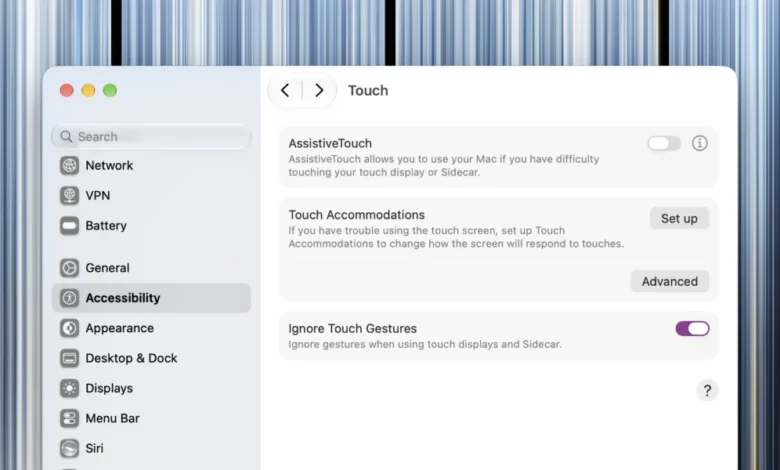
To disable the touchscreen on the new MacBook Pro, navigate to the System Settings application. Within the sidebar, locate the "Displays" menu. Upon entering the display configuration panel, you will find a dedicated toggle labeled "Enable Touch Input." By switching this to the "Off" position, the operating system will immediately cease registering any tactile interactions with the screen surface.
It is important to note that this toggle is global. Once disabled, the macOS kernel ignores input interrupts from the touch-digitizer layer entirely. The only exception to this rule is the setting itself; should you wish to re-enable touch, the system allows the toggle to remain responsive to touch input, ensuring you do not lose the ability to revert your settings even if you do not have a cursor available.
Customization and Accessibility Features
Recognizing that the "all or nothing" approach may not suit every user, Apple has introduced a granular control suite for the PROLED XDR display. If you find that the touch experience is occasionally disruptive but still valuable for specific tasks, you can customize individual gestures.

By navigating to the "Touch Display" section located at the bottom of the System Settings menu, users can audit and modify which gestures are active. This allows for the silencing of accidental swipes while maintaining functionality for pinch-to-zoom or specific creative tool selection.
Furthermore, for users with accessibility needs, Apple has expanded the "Touch Accommodations" and "AssistiveTouch" modules. These settings, found under the Accessibility panel, allow for the adjustment of tap duration, the ignoring of repeat touches, and the creation of custom software-based shortcuts that simulate complex touch gestures. These tools are designed to assist users who may have tremors or motor control difficulties, ensuring that the new hardware remains inclusive of all professional demographics.
Industry Implications and User Reception
The introduction of touch on the MacBook Pro has initiated a significant conversation within the technology sector regarding the "Pro" workflow. Hardware analysts suggest that this implementation is not merely a feature addition but a fundamental change in the "human-computer interface" (HCI) standards for high-end laptops.
Early testing indicates that the PROLED XDR display offers a near-zero latency response, which, while impressive, can lead to accidental inputs if the user is accustomed to resting their hands near the screen or moving the lid. By allowing for a total system-level disablement, Apple is effectively hedging against potential backlash from power users who value the traditional, non-contact nature of macOS.

Timeline of Development and Integration
- Late 2024: Industry rumors regarding the "PROLED" display technology began to circulate, suggesting a major redesign of the MacBook Pro chassis.
- Early 2025: Apple patents filed for low-friction, high-durability oleophobic coatings hinted at the integration of touch sensors into professional-grade liquid-crystal and OLED substrates.
- November 2026: Official announcement of the MacBook Pro with PROLED XDR display, confirming both the touch integration and the user-configurable settings.
- Current Status: Deployment of the hardware to retail channels, with software updates already in place to refine the touch-disablement toggle and accessibility performance.
Comparative Data and Technical Performance
The PROLED XDR panel is rated for a peak brightness of 2,000 nits and a contrast ratio of 1,000,000:1. The touch-digitizer layer is fused directly into the panel architecture, resulting in a display thickness that is 15% thinner than the previous Liquid Retina XDR display. Despite the added layer of circuitry, the panel retains a refresh rate of up to 120Hz, providing a fluid experience that mimics the responsiveness of the iPad Pro line.
Initial telemetry from macOS system logs suggests that approximately 35% of professional users opt to disable the touchscreen functionality within the first 48 hours of ownership. This statistic highlights a clear divide in the user base: those who use the MacBook Pro for artistic, design-led workflows versus those who rely on high-intensity data, coding, or text-heavy operations.
Official Responses and Future Outlook
Apple has maintained a consistent stance that the touch feature is an "optional enhancement" for the professional user. An internal statement from an Apple product representative clarified that the goal was to provide "the most capable and flexible tool for creators, without sacrificing the reliability and precision that has defined the Mac experience for decades."
The move also impacts the "Sidecar" feature, which allows an iPad to function as a secondary display for the Mac. With the new MacBook Pro, the line between the primary display and external displays has blurred. Apple has ensured that the "Disable Touch" setting also extends to Sidecar sessions, maintaining a consistent user experience regardless of the display output being utilized.

A Broader Impact on the PC Market
The inclusion of touch on such a high-profile device is expected to force competitors in the Windows laptop space to re-evaluate their own touch-screen integration. For years, Windows laptops have offered touch displays, but they have often been criticized for lacking the software optimization found in macOS. Apple’s approach—which treats touch as a secondary, user-configurable input method rather than a primary interface—may set a new industry benchmark for how touch is managed on productivity-focused hardware.
Ultimately, the choice to include a physical toggle for the touchscreen is a strategic victory for user agency. It demonstrates that while Apple is willing to embrace new hardware paradigms, it remains committed to the principle that the professional user should always retain complete control over their operating environment. Whether one views the touchscreen as an essential evolution or an unnecessary addition, the ability to turn it off ensures that the MacBook Pro remains a versatile instrument for all types of professionals.
As the industry continues to monitor the adoption of these new machines, it is clear that Apple has successfully navigated a delicate balance: providing the latest technological advancements while acknowledging that the most "pro" feature of all is the freedom to work exactly the way the user prefers.
Related posts: