Windows 11’s taskbar can now be moved, but not by dragging — here’s why Microsoft made that decision,…


A Chronology of the Windows 11 Taskbar Evolution
To understand the current impasse, it is necessary to examine the trajectory of the Windows taskbar since the launch of Windows 11 in October 2021. Upon its initial release, Windows 11 introduced a radically redesigned taskbar. In a departure from the flexibility offered by Windows 10—where users could anchor the taskbar to the left, right, top, or bottom of the screen—the initial Windows 11 iteration restricted the bar exclusively to the bottom.
This design decision was met with significant resistance from the user base, particularly among professionals who utilized multi-monitor setups or specific vertical screen configurations. For these users, the inability to move the taskbar was not merely an aesthetic grievance but a functional impediment to workflow efficiency.

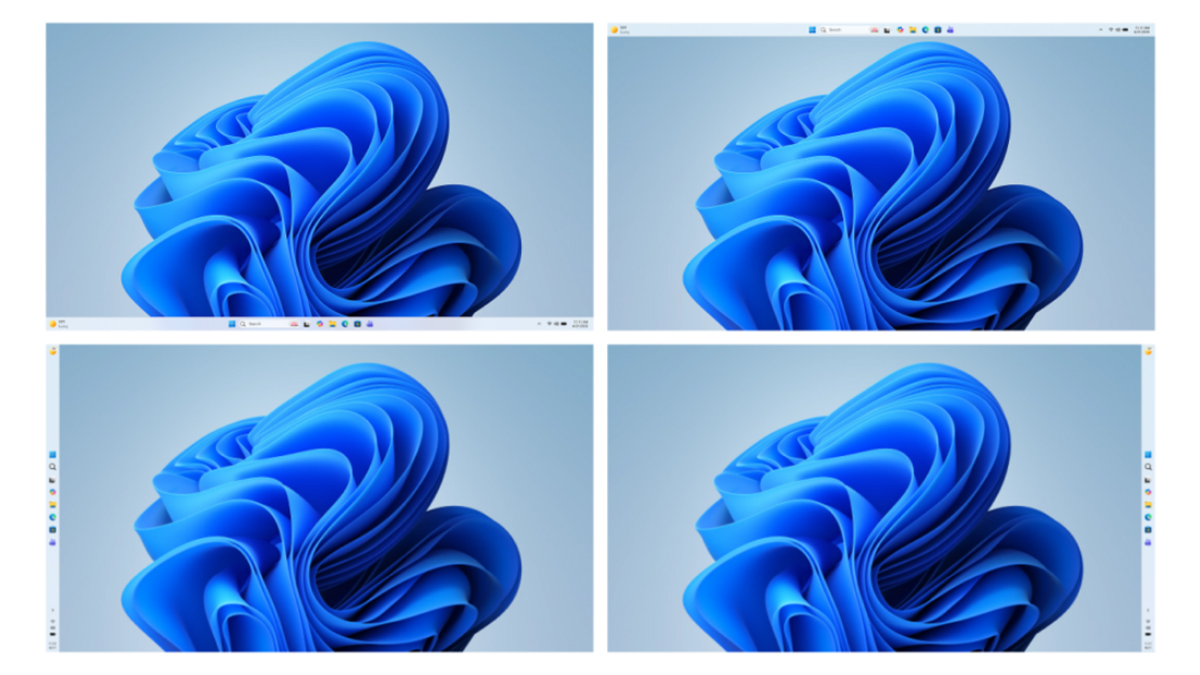
Throughout 2022, 2023, and 2024, feedback via the Windows Insider program remained consistent: users wanted their flexibility back. By mid-2026, Microsoft finally addressed this core demand, rolling out an update that permitted the repositioning of the taskbar. However, the implementation was strictly functional rather than intuitive; users were required to navigate through the Settings application to toggle the alignment. This "manual" approach left a segment of the user base frustrated, as it lacked the immediate, tactile responsiveness of the "drag-and-drop" functionality available in Windows 95 through Windows 10.
The Rationale Behind the Design Constraints
The primary criticism leveled against Microsoft is that the company has prioritized a "walled garden" approach to UI, sacrificing utility for the sake of a polished, uniform appearance. However, Diego Baca, Vice President of Design for Windows, recently offered a defense of the current architecture, shedding light on the telemetry and user research that informed these decisions.
According to internal data analyzed by Microsoft, the legacy implementation—which allowed users to grab and drag the taskbar—led to a statistically significant volume of "accidental taskbar movements." For the average consumer, particularly those less comfortable with OS-level troubleshooting, a taskbar that suddenly shifts to the side or top of the screen is a source of confusion and technical support burden.

"We saw a significant volume of accidental taskbar movements," Baca noted in recent discourse. The design team concluded that for the vast majority of the global user base, the "cost" of the feature—accidental displacement—outweighed the "benefit" of the occasional, intentional movement.
The Friction of "Locking" Mechanisms
Critics of the current design have frequently pointed to the "Lock the Taskbar" feature, a staple of previous Windows versions, as an obvious compromise. Under that system, a user could move the bar if they chose, but could otherwise lock it to prevent accidents.
From a design perspective, however, Microsoft argues that this introduces unnecessary "friction." To move the taskbar in such a scenario, a user would first need to unlock it, move it, and then remember to lock it again. Microsoft’s stance is that this creates a multi-step process for a task that, for 95% of users, is performed perhaps once or twice in the entire lifespan of a computer. By forcing the movement through the Settings menu, Microsoft has effectively turned a "dangerous" UI element into an "intentional" configuration choice.
Broader Implications: Usability vs. Customization
The broader implication of this design choice is the shifting philosophy of the Windows OS. Since the inception of the Fluent Design system, Microsoft has sought to create a consistent, reliable environment. The removal of certain legacy features is often an attempt to reduce the "technical debt" of the operating system—the accumulation of old code and configuration layers that can lead to bugs, stability issues, and inconsistent visual experiences.
Data from third-party UX studies suggests that while power users represent a vocal minority, they are the individuals most likely to influence the adoption of an OS in enterprise environments. By alienating this demographic, Microsoft risks creating a perception that Windows is becoming less "pro" and more "consumer-centric." Conversely, for the millions of casual users—including students, elderly users, and those in emerging markets—a simplified, immutable taskbar significantly reduces the likelihood of "broken" interfaces that require professional assistance to fix.
Addressing the Power User Gap
Despite the official stance, the demand for granular control remains. The emergence of third-party utilities serves as a barometer for this unmet demand. Tools such as Taskbar Location Options on GitHub and various modules within the Windhawk customization suite have seen increased usage. These applications bypass the standard Windows constraints, restoring the ability to drag the taskbar or add it to the context menu.

However, relying on third-party tools is not without risk. Because Microsoft frequently updates the core components of the Windows shell, these modifications can become unstable. A patch to the Windows Explorer process could, at any moment, break a third-party customization, leaving the user with a crashed or non-functional taskbar. This volatility is precisely why Microsoft is hesitant to implement "unlocked" UI elements natively; the company cannot guarantee the stability of a system that is being actively modified by non-official, third-party software layers.
Future Outlook and Potential Compromises
Is the door closed on a return to native drag-and-drop functionality? Microsoft officials have been careful to avoid definitive language. While the current design is optimized for the widest possible audience, the company has shown a history of backtracking when the volume of feedback reaches a critical mass.
One potential, and perhaps likely, compromise involves enhancing the right-click menu on the taskbar itself. By adding a "Taskbar Position" submenu directly to the right-click menu, Microsoft could bridge the gap between ease of access and the prevention of accidental movement. This would allow power users to change their configuration in two clicks—without navigating to the Settings app—while simultaneously ensuring that the bar cannot be "grabbed" and shifted unintentionally.

As Windows 11 continues to mature, the company remains in a delicate balancing act. They must appease the millions of users who value stability and simplicity, while ensuring that the OS remains a viable tool for professionals who view the desktop as a modular workspace.
For the time being, the "official" Windows 11 experience remains one of intentional, settings-based configuration. For those who find this insufficient, the developer community continues to fill the gap, albeit with the inherent risks associated with system-level modifications. The conversation serves as a reminder that in the world of modern software development, the most difficult challenge is often not building a feature, but deciding whether that feature contributes to a coherent, reliable experience or serves as a point of potential failure for the user. As the landscape of personal computing shifts further toward cloud integration and mobile-inspired design, the "classic" desktop experience continues to be refined, leaving behind the chaotic flexibility of the past in favor of a more managed, predictable future.