Instagram Enhances User Autonomy with Expansion of Your Algorithm Control Features to Explore Feed

Instagram has officially announced a significant expansion of its "Your Algorithm" content recommendation control system, marking a pivotal shift in how the platform manages user interests and discovery. Previously limited to the Reels tab, this manual customization tool is now being integrated into the Instagram Explore feed, allowing users to actively dictate the types of content they wish to see—and, perhaps more importantly, what they wish to avoid. This update represents a strategic effort by Meta to address long-standing criticisms regarding algorithmic transparency and user agency within its ecosystem.
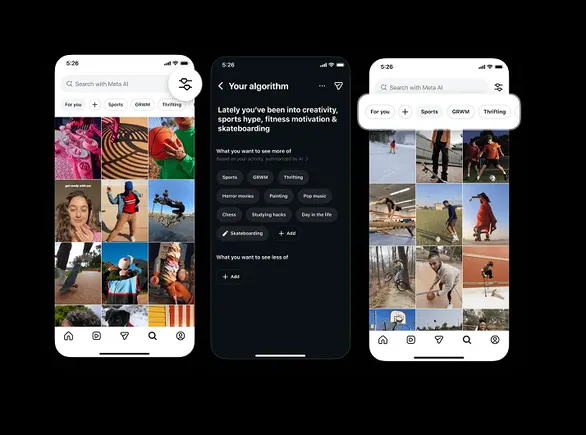
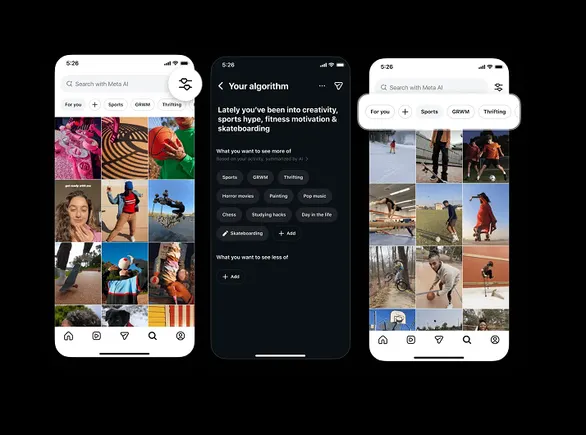
The "Your Algorithm" feature functions as a direct input mechanism. Rather than relying solely on passive signals—such as how long a user hovers over a post or whether they tap the "like" heart—the tool provides a dedicated interface where users can type in specific topics of interest. These inputs serve as high-priority signals for the recommendation engine, effectively guiding the automated systems toward a more personalized stream of content. With the latest rollout, these preferences are no longer siloed within the short-form video section of the app; they now influence the broader discovery landscape of the Explore page.
The Mechanics of Cross-Surface Synchronization
A core component of this update is the unified nature of Instagram’s recommendation architecture. According to official statements from the company, the "Your Algorithm" tool operates on a singular logic that spans multiple surfaces. "It’s all one system," Instagram noted during the announcement. This means that if a user adjusts their preferences while browsing Reels, those changes will immediately manifest in the Explore feed, and vice versa.
The interface for these controls has been designed for high visibility. In the Explore tab, users will notice "topic pills"—small, interactive buttons at the top of the screen—that allow for the immediate addition or removal of interests. This provides a more friction-less experience than traditional settings menus, which are often buried several layers deep within the app’s architecture. Furthermore, the update includes a social component: users are now encouraged to share their curated interests via Instagram Stories, a move intended to normalize the act of manual algorithm tuning among the broader user base.
Evolution of Feed Controls: A Chronological Context
To understand the significance of this expansion, one must look at the history of Instagram’s relationship with its users and its algorithm. For years, the platform has faced a tug-of-war between those who demand a simple chronological feed and the company’s data-driven insistence that algorithmic curation improves user retention.
In 2016, Instagram made the controversial decision to move away from the chronological feed, a move that sparked widespread user backlash. For nearly six years, the platform remained strictly algorithmic until 2022, when it reintroduced "Following" and "Favorites" views. These views allowed users to see posts in time-order, but they were not set as the default, requiring users to manually switch to them every time they opened the app.
The testing for the specific "Your Algorithm" manual input began in October 2023, specifically targeting the Reels feed. Reels, which was launched to compete with TikTok’s hyper-efficient "For You" page, relied heavily on black-box AI to keep users engaged. By introducing manual controls to Reels first, Instagram was testing whether users would actually take the time to "train" their own AI. The current expansion to Explore indicates that the initial testing phase was successful enough to warrant a wider rollout.
The Role of AI and Engagement Data
The expansion comes at a time when Meta is doubling down on artificial intelligence as the primary driver of its business growth. In recent quarterly earnings calls, Meta CEO Mark Zuckerberg has repeatedly highlighted that AI-driven recommendations are responsible for a significant increase in time spent on the platform. Specifically, Meta reported that AI recommendations led to a 24% increase in time spent on Instagram since the integration of more sophisticated discovery engines.
However, this reliance on AI has created a "black box" problem. Users often feel that the content they are shown is repetitive or skewed toward viral trends rather than personal interests. By offering "Your Algorithm" controls, Instagram is attempting to bridge the gap between automated efficiency and human intent.
Data from social media analysts suggests that while users frequently complain about algorithms, only a small percentage—estimated between 5% and 12%—regularly interact with deep-level privacy or customization settings. By placing the "Your Algorithm" controls directly into the Explore feed via "topic pills," Instagram is attempting to lower the barrier to entry, hoping to increase the percentage of users who actively manage their digital environment.
Addressing the "Choice Paradox" and Regulatory Pressure
The decision to grant more manual control is not merely a user-experience choice; it is also a strategic response to a changing regulatory landscape. In the European Union, the Digital Services Act (DSA) and the Digital Markets Act (DMA) have placed increased pressure on "Very Large Online Platforms" (VLOPs) to be more transparent about their recommendation systems. Regulators have argued that users should have the right to opt out of profiling or, at the very least, have a say in how their profiles are constructed.
By implementing these controls globally, starting with English-language users, Meta is positioning itself as a leader in "responsible AI." This move allows the company to argue to regulators that it is providing sufficient transparency and control, potentially heading off more restrictive legislation that could mandate even deeper changes to the core business model.
Industry experts also point to the "Choice Paradox" in social media. When users are given too much control, they sometimes find the experience less engaging because the element of serendipity—discovering something you didn’t know you liked—is lost. Meta’s challenge is to balance the manual inputs from "Your Algorithm" with the automated "Discovery Engine" to ensure the feed remains fresh while still feeling personalized.
Reactions from Creators and Market Analysts
The creator community has met the news with a mixture of optimism and caution. For niche creators, the "Your Algorithm" tool could be a boon. If users can explicitly tell Instagram they want to see more "pottery" or "vintage car restoration," those niche creators may see a more dedicated and engaged audience, rather than relying on the whims of a general-interest algorithm.
Conversely, some market analysts worry that manual controls could lead to "filter bubbles" where users only see content that reinforces their existing views, potentially limiting the platform’s ability to introduce new trends or advertising categories. However, Meta’s internal data likely suggests that a user who feels in control is a user who stays on the platform longer.
"The goal for Meta isn’t just to show you what you want; it’s to make you feel like the app understands you," says digital media strategist Elena Rodriguez. "When a user manually types in a preference, they are making a psychological investment in the platform. They are more likely to return to see if the ‘training’ worked."
Broader Implications for the Social Media Landscape
Instagram’s move is likely to trigger similar updates from competitors. TikTok has already experimented with "refresh" buttons that reset the For You page, but Instagram’s "Your Algorithm" goes a step further by allowing for granular, keyword-based steering. If this model proves successful in maintaining high engagement while reducing user frustration, it could become the new standard for the industry.
Furthermore, this update signals the end of the "Social Graph" era and the total dominance of the "Interest Graph." For the first decade of social media, your feed was determined by who you followed (friends, family, celebrities). Now, your feed is determined by what you like, regardless of who posted it. By giving users a "steering wheel" for their Interest Graph, Instagram is acknowledging that the future of social media is less about social networking and more about personalized entertainment consumption.
As of the current rollout, the expanded "Your Algorithm" controls are available to all English-language users globally. Instagram has indicated that it will monitor engagement with these tools before potentially expanding the feature to other languages and regions. For now, the update stands as Meta’s most significant attempt yet to humanize the algorithms that define the modern digital experience, offering a glimpse into a future where the line between human preference and machine learning becomes increasingly blurred.