AWS Elastic Beanstalk Unveils Fully Managed Cluster Mode Powered by Amazon EKS to Streamline Microservices Management

Fifteen years after its initial market introduction, Amazon Web Services (AWS) has announced a major evolutionary milestone for its premier application deployment and management service: the official launch of AWS Elastic Beanstalk Cluster Mode. Designed specifically to alleviate the operational burdens faced by engineering organizations managing diverse microservices portfolios, the new deployment engine leverages Amazon Elastic Kubernetes Service (Amazon EKS) to offer a unified, cost-efficient infrastructure layer. The announcement marks the latest chapter in a comprehensive modernization initiative that has reimagined the platform’s foundational architecture to support modern, container-driven development workflows without sacrificing the signature simplicity that made the original service an industry standard.
Evolution of a Cloud Pioneer
Launched in 2011, AWS Elastic Beanstalk revolutionized full-stack application deployment by abstracting away the underlying infrastructure provisioning, load balancing, and scaling concerns. Developers writing in Java, .NET, Python, Node.js, PHP, Ruby, and Go could simply upload their source code and rely on the platform to manage the operational lifecycle. Over the ensuing decade and a half, the cloud computing landscape shifted dramatically. Monolithic architectures gave way to distributed microservices, and containerization technologies—led by Docker and Kubernetes—became the global baseline for scalable cloud-native engineering.
Recognizing these industry transformations, AWS embarked on an extensive, multi-year rebuilding effort to modernize Elastic Beanstalk’s operational engine. Recent additions to the service ecosystem include AI-powered environment analysis designed to diagnose runtime health anomalies and automatically suggest remediation steps. Furthermore, the introduction of an official GitHub Action enabled development teams to instantiate continuous integration and continuous deployment (CI/CD) pipelines directly from existing YAML configuration files.
The underlying infrastructure has also been completely overhauled to incorporate OpenTelemetry-based observability standards, sophisticated traffic-splitting capabilities featuring automatic rollback mechanisms, event-driven autoscaling, centralized secrets management via AWS Secrets Manager, and HTTPS enabled by default through AWS Certificate Manager. The debut of Cluster Mode represents the culmination of these modernization efforts, bridging the gap between traditional platform-as-a-service (PaaS) simplicity and the robust orchestration power of enterprise Kubernetes.
Architecture and Shared Infrastructure Model
The newly introduced Cluster Mode is fundamentally engineered for organizations operating complex portfolios of multiple applications or microservices. Historically, running disparate applications often required isolating them across distinct environments, which could introduce infrastructure sprawl, operational overhead, and redundant administrative costs.

Under the new Cluster Mode architecture, multiple applications can securely share a single, underlying infrastructure framework powered by Amazon EKS, all while maintaining a centralized operational baseline. By pooling resources across a shared cluster, organizations can significantly reduce per-application infrastructure overhead as their application portfolios expand. Whether a firm manages a dozen microservices or hundreds of independent workloads, administrators interact with a single, cohesive management experience that guarantees consistent operational policies across every technical stack.
The deployment paradigm remains accessible to developers regardless of how their applications are packaged. Engineering teams can submit raw source code, Dockerfiles, or fully pre-built container images. For environments utilizing pre-packaged containers, images hosted in Amazon Elastic Container Registry (Amazon ECR) can be seamlessly integrated into the deployment pipeline. AWS handles the complex orchestration underneath, ensuring continuous patching, rolling upgrades, health monitoring, and elastic scaling for the entire lifespan of the workload.
Deployment Workflow and Tooling Integration
Getting started with Elastic Beanstalk Cluster Mode is accessible through multiple administrative interfaces, including the AWS Management Console, the AWS Command Line Interface (CLI), the dedicated EB CLI, and various language-specific AWS Software Development Kits (SDKs).

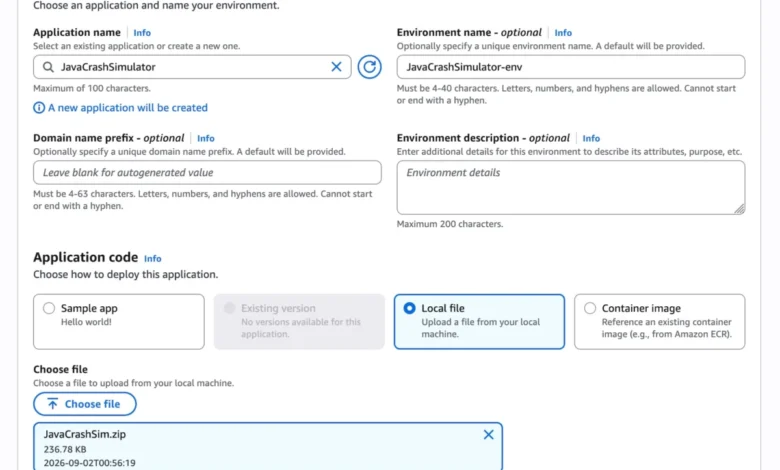
Within the AWS Management Console, developers create a new environment and designate "Cluster" as the deployment type. Selecting local files or specifying container image build options initiates the automated provisioning sequence. For a fresh configuration across a new set of subnets, the system automatically provisions the underlying Amazon EKS cluster—a process that typically takes approximately ten minutes. Subsequent deployments execute significantly faster by intelligently leveraging the pre-existing EKS cluster foundation.
For automation-driven workflows, infrastructure-as-code and API integrations allow DevOps teams to codify multi-service deployments efficiently. For instance, engineers can establish microservice architectures by registering application versions within Amazon ECR and defining granular configuration options via JSON namespaces. These configuration manifests allow administrators to define crucial parameters, such as allocating specific CPU shares, setting memory limits and request thresholds, configuring internal or internet-facing Application Load Balancers (ALBs), and defining custom health check paths like /_healthz.
Crucially, AWS has ensured that the introduction of Cluster Mode does not disrupt existing operations. Elastic Beanstalk Standard Mode, powered by Amazon Elastic Compute Cloud (Amazon EC2), remains fully supported. Standard and Cluster Mode environments are capable of running side-by-side within the exact same Elastic Beanstalk application structure. This architectural flexibility empowers engineering teams to migrate legacy environments to the new Kubernetes-backed model at their own measured pace. Comprehensive validation checks run prior to any transition to confirm compatibility, ensuring that no team is forced into an abrupt or unsupported migration path. Standard Mode continues to serve as an ideal architectural fit for specific monolithic workloads, background workers, or applications requiring direct, unabstracted control over individual EC2 compute instances.

Pricing Structure and Regional Availability
AWS Elastic Beanstalk Cluster Mode is generally available immediately across all commercial AWS regions where the standard Elastic Beanstalk service is offered. Teams seeking detailed regional availability metrics, roadmap updates, or troubleshooting guidance can utilize the AWS Capabilities by Region portal or integrate the newly introduced AWS MCP Server and associated plugins with their preferred artificial intelligence development tools.
Regarding financial implications, AWS has confirmed that there is no additional service fee specifically for using Elastic Beanstalk Cluster Mode. Customers are billed strictly for the underlying AWS resources consumed by their applications. These associated costs include the standard Amazon EKS control plane fee, EKS Auto Mode compute resources (which carry an approximate 12% premium over baseline EC2 instance costs), Amazon ECR storage and data transfer, and Amazon CloudWatch monitoring logs. Administrators should note that Elastic Beanstalk Cluster Mode environments are not eligible for the AWS Free Tier. Comprehensive pricing documentation is available on the official AWS Elastic Beanstalk Pricing webpage, while technical guidance and community discussions can be accessed via AWS re:Post.