Apple Unveils iOS 27 Beta 4, Refining Features and Hinting at Future Hardware Innovations

Apple on Monday, July 20, 2026, at 2:50 pm PDT, released the fourth developer beta of iOS 27, signaling the company’s continued efforts to fine-tune its flagship mobile operating system ahead of its anticipated public launch in September. While this iteration introduces fewer dramatic changes compared to earlier betas, it nonetheless brings a suite of notable refinements and new functionalities across various core applications and system settings, with a particular focus on media consumption, Siri’s capabilities, professional-grade tools, and system-level connectivity. Furthermore, code within the beta hints at intriguing future hardware developments, specifically referencing an iPhone with a dual-battery configuration.
The release of iOS 27 Beta 4 underscores Apple’s meticulous, iterative development process, where features are introduced, tested, refined, and sometimes re-evaluated based on developer feedback and internal assessments. This current beta primarily focuses on polishing the user experience and enhancing existing features, rather than unveiling entirely new paradigms, as the Cupertino giant prepares for a September rollout that is expected to heavily feature advancements in artificial intelligence, spearheaded by the new "Apple Intelligence" suite.
Key Enhancements and Refinements in iOS 27 Beta 4
This beta brings targeted improvements to several key areas of the iOS ecosystem, demonstrating Apple’s commitment to both user convenience and advanced functionality.
Refined Media Consumption: Updates to TV and Photos Apps
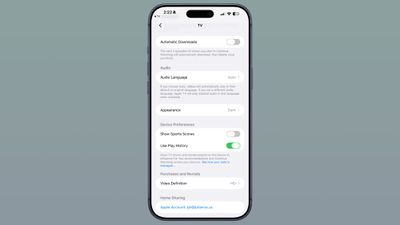
One of the most user-centric updates arrives within the Apple TV app. A new "Automatic Downloads" toggle has been integrated into the app’s Settings section. When enabled, this feature intelligently downloads the next two episodes of any show a user has started and placed in their "Continue Watching" queue. This proactive downloading ensures a seamless, uninterrupted viewing experience, especially beneficial for users with inconsistent internet access or those who prefer to consume content offline. Once the downloaded episodes are watched, they are automatically deleted to conserve storage space, a thoughtful consideration for device management. This functionality streamlines the process of binge-watching and reflects a growing trend towards anticipating user needs in media consumption, mitigating potential frustrations caused by buffering or manual downloads.
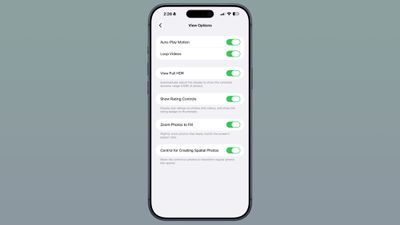
The Photos app also receives a subtle but impactful visual tweak with the introduction of a "Zoom Photos to Fill" toggle within its Settings menu. This feature, which is turned on by default, subtly zooms photos that closely match the screen’s aspect ratio. The intention behind this is to eliminate small black bars that might appear on the edges of certain images, providing a more immersive, full-screen viewing experience. While a minor adjustment, it speaks to Apple’s attention to detail in visual presentation, aiming for a cleaner, more aesthetically pleasing photo browsing experience on modern iPhone displays. Users who prefer to see the entire uncropped image, regardless of aspect ratio, retain the flexibility to disable this feature.

Evolution of Siri: Voice, Settings, and Accessibility
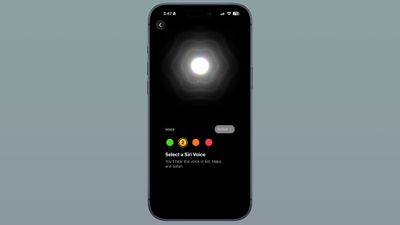
Apple’s virtual assistant, Siri, continues its evolution with significant changes in Beta 4, particularly concerning its voice options and accessibility features. The Siri Voice selection interface has been revamped, presenting a more modern and intuitive design. On devices that do not support the customizable voice feature, the interface now mirrors the custom voice look, offering a broader selection of voices and accents for users to choose from. For devices equipped with custom Siri selections, Apple indicates that "more voices options" are "coming soon," suggesting an expansion of personalized vocal identities for the AI. This push towards more diverse and customizable Siri voices aligns with Apple’s long-standing efforts to make its products more inclusive and personable.
It’s important to note the current hardware limitations for the customizable Siri voice, which is presently restricted to the high-end iPhone 17 Pro, iPhone 17 Pro Max, and the forthcoming iPhone Air. This suggests that the custom voice feature likely leverages advanced processing capabilities, possibly related to on-device neural engines, found exclusively in these premium models. This strategy is typical for Apple, often introducing cutting-edge features on its newest and most powerful devices before broader adoption.
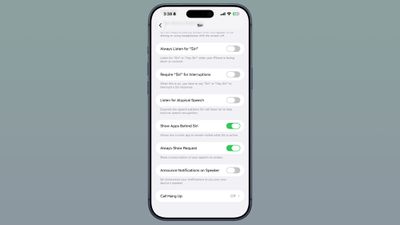
Further enhancing Siri’s user experience are new options within the Siri section of the Settings app. Users can now adjust the length of Siri previews within the Siri app, choosing from up to five lines of text or opting for no preview at all. This granular control allows users to tailor the visual feedback from Siri to their preference, balancing conciseness with detailed information. This feature is particularly useful for those who interact with Siri frequently and want to optimize their information intake.
In a move that underscores Apple’s commitment to accessibility, a new "Always Show Request" toggle has been added under Accessibility settings. When activated, this feature ensures that a transcription of what the user says to Siri is consistently displayed on the screen. This provides visual confirmation of the command, which is invaluable for users with hearing impairments or those in noisy environments, enhancing the reliability and clarity of Siri interactions. This addition is a clear example of Apple’s ongoing efforts to make its technology usable and empowering for a wider audience, building on a foundation of robust accessibility features.
Additionally, a small but helpful update appears when users swipe down to access the Siri Search or Ask interface. A new splash screen now greets users, providing a brief explanation of the interface’s functionalities. This onboarding element is crucial for guiding users through new features and ensuring they understand how to leverage Siri’s full potential for search and queries, especially as the assistant becomes more context-aware with Apple Intelligence.
Professional Tools and Connectivity Optimizations
Beyond user interface and AI enhancements, iOS 27 Beta 4 also delivers substantial improvements for professional users and offers more granular control over connectivity.
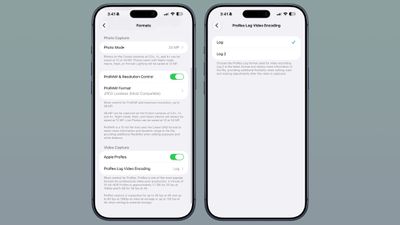
For videographers and content creators, the Camera section of the Settings app introduces a significant advancement: the option to choose a ProRes log format when Apple ProRes video recording is enabled. Users can now select between "Log" and "Log 2" for ProRes Log Video Encoding. Log 2 is particularly noteworthy as it represents the latest format, designed to retain even more information within the video file. This increased data retention provides significantly greater flexibility during post-production, allowing for more extensive color grading, dynamic range adjustments, and overall fine-tuning of the video. This feature further solidifies the iPhone’s position as a capable professional-grade video camera, empowering filmmakers and creators to capture high-quality footage that rivals dedicated cinema cameras, especially when paired with the advanced sensors of the iPhone 17 Pro models.
Connectivity also sees a refinement with the introduction of per-network control for Wi-Fi Assist. Previously, Wi-Fi Assist was often an all-or-nothing master toggle. Now, users can enable or disable Connectivity Assist for individual Wi-Fi networks, irrespective of the global master toggle’s status. This granular control is immensely practical, allowing users to prevent automatic cellular data usage on specific, potentially unreliable Wi-Fi networks, while still benefiting from Connectivity Assist on others. This empowers users to better manage their data usage and ensure a stable connection only when desired.
Finally, the AirPods integration within Control Center has received a visual overhaul. The options for AirPods in Control Center have been redesigned, presenting a cleaner and potentially more intuitive layout. Crucially, this update also adds "more options for Adaptive mode," indicating Apple’s continuous effort to enhance the intelligent audio capabilities of its AirPods line. Adaptive mode dynamically adjusts noise control based on the user’s environment, and these new options likely provide users with more control over its sensitivity or specific behaviors, further personalizing the listening experience.
Notable Reversal: Wallpaper Feature Removal
Interestingly, iOS 27 Beta 4 also marks the removal of a wallpaper feature that had been introduced in Beta 3. This feature previously allowed users to see a cutout of the subject of their Home Screen wallpaper in the Notification Center when swiping down. The disappearance of this visual effect suggests that Apple may have either received negative feedback, encountered technical challenges, or decided to re-evaluate its utility or design direction. Such removals are not uncommon during the beta cycle, as Apple iterates rapidly to achieve the optimal user experience for the final release. It highlights the dynamic nature of beta development, where features can be added, modified, or even withdrawn based on ongoing testing and strategic decisions.
Future Glimpse: Dual Battery iPhone References
Perhaps one of the most intriguing discoveries within the code of iOS 27 Beta 4 is the presence of references to a dual-battery iPhone. Strings within the system code, such as "The batteries in this iPhone are performing as expected," directly allude to a device housing more than one power source. This revelation is particularly significant as it aligns with persistent rumors and industry speculation surrounding Apple’s development of a foldable iPhone Ultra. A dual-battery design is a common engineering solution for foldable devices, allowing for better weight distribution, increased capacity, and improved thermal management in complex form factors.
The inclusion of these code references in iOS 27 Beta 4 suggests that Apple is actively developing or at least laying the software groundwork for such a device. While the foldable iPhone Ultra is not expected to launch in conjunction with iOS 27 this September, these internal references indicate that the project is progressing and that Apple is preparing its operating system to support the unique hardware requirements of a multi-battery iPhone. This could herald a new era of iPhone design, potentially offering significantly extended battery life or enabling entirely new form factors that demand innovative power solutions.
Broader Context: The Road to iOS 27’s Public Release
The release of iOS 27 Beta 4 is a critical step in Apple’s journey towards its public debut in September. The overall theme for iOS 27, as initially unveiled at WWDC 2026, revolves heavily around the integration of advanced Apple Intelligence, a suite of generative AI features designed to enhance productivity, creativity, and personalization across the iPhone ecosystem. Previous betas have seen the introduction of a smarter, more context-aware Siri, capable of understanding personal context and performing more complex, multi-step tasks.
Beyond the core OS enhancements, Apple has also announced new perks for iCloud+ subscribers on iOS 27. These include increased daily usage limits for certain Apple Intelligence features, such as image generation within the revamped Image Playground app, and the ability for HomeKit Secure Video cameras to generate video summaries and insights, leveraging on-device AI for enhanced home security. These additions underscore Apple’s strategy to tie premium software features to its subscription services and hardware capabilities.
The iterative nature of these beta releases, from the initial developer betas following the WWDC 2026 keynote (Beta 1, then Beta 2 released on Monday, June 22, 2026), to the current fourth beta, demonstrates Apple’s commitment to refining its operating system. Each beta brings a mix of new features, performance improvements, and bug fixes, shaping the final product based on extensive testing and developer feedback. The relatively fewer groundbreaking additions in Beta 4, compared to earlier versions, suggest that the core feature set is largely in place, and the focus has shifted towards stabilization, optimization, and fine-tuning the user experience.
Implications and Outlook
The iOS 27 Beta 4 release provides a clearer picture of the upcoming operating system’s capabilities and Apple’s strategic direction. The enhancements in media apps, Siri’s intelligence, and accessibility features demonstrate a user-centric approach, aiming to make daily interactions more seamless and inclusive. The advanced ProRes log formats reinforce the iPhone’s growing appeal to professional content creators, blurring the lines between consumer and pro-grade devices.
Perhaps most exciting are the subtle but significant hints at future hardware, particularly the dual-battery iPhone references. These insights offer a tantalizing glimpse into Apple’s long-term product roadmap, suggesting that the company is actively preparing for groundbreaking form factors like a foldable iPhone Ultra. This foreshadows a future where iOS will need to seamlessly adapt to entirely new hardware designs and user interaction paradigms.
As Apple moves closer to the final release of iOS 27 in September, developers and eager users will undoubtedly continue to dissect each beta, anticipating the full scope of features and refinements that will define the next generation of iPhone experience. The journey from initial concept to public launch is complex, and Beta 4 represents a crucial checkpoint in ensuring a polished, powerful, and forward-looking operating system.