Building a Native Windows Executable from Scratch Using a Spreadsheet Assembler

The intersection of low-level software engineering and unconventional tooling has yielded a fascinating educational project that demonstrates the core mechanics of executable file generation. A newly published open-source project titled the "Simple Spreadsheet Assembler" revives a vintage engineering methodology from the early 2000s, utilizing LibreOffice Calc and a PowerShell script to translate human-readable spreadsheet parameters into a fully functional, native Windows x86 executable file.
This educational tool was created by software developer kg7hf, who designed the project to demystify binary formats, instruction encoding, and the internal structures of Portable Executable (PE) files. By bridging the gap between high-level spreadsheet formulas and low-level machine code, the project offers engineers, computer science students, and retro-computing enthusiasts a tangible way to inspect the foundational layers of operating system execution without the immediate complexity of traditional, heavy-weight toolchains.
Historical Context: The Origins of Spreadsheet-Based Prototyping
To understand the rationale behind the Simple Spreadsheet Assembler, one must look back to the early 2000s during the early bring-up phases of custom digital signal processors (DSPs). When a semiconductor team receives a newly fabricated Application-Specific Integrated Circuit (ASIC) or programmable DSP with a novel, proprietary instruction set, the software ecosystem is rarely complete.
During those critical initial testing phases, compiler teams, assembler developers, and hardware designers often race against the clock. Hardware validation engineers frequently cannot wait for a fully featured assembler or compiler suite to be finalized just to test basic functionality—such as verifying that a clock signal is stable, a memory bus is functional, or a specific I/O pin can toggle via memory-mapped registers.
In these high-pressure scenarios, engineers historically resorted to lightweight, pragmatic solutions. By utilizing spreadsheet applications like Microsoft Excel, developers could calculate instruction machine codes directly from the bitfields of a processor’s instruction set architecture (ISA) manual. This allowed teams to rapidly author micro-programs, loop instructions, and jump commands before traditional development tools were ready for deployment. The newly released x86 spreadsheet assembler pays homage to this resourceful engineering tradition while modernizing it for educational exploration on contemporary Windows systems.
Anatomy of the Spreadsheet Assembler
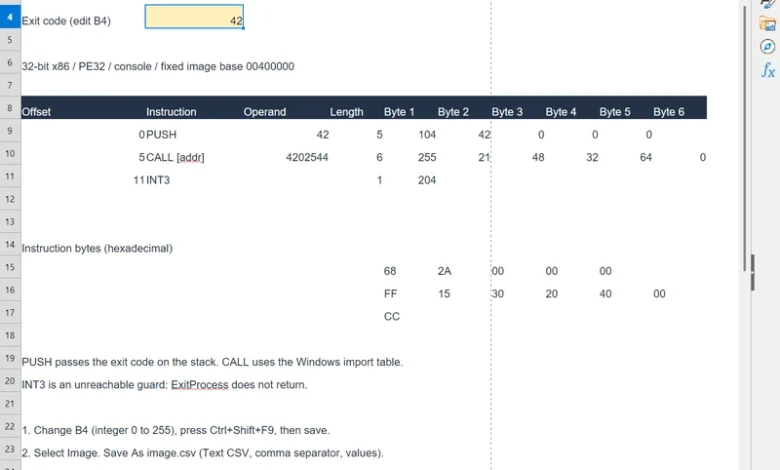
The project architecture relies on a structured separation between formula-based logic and binary translation. Built using LibreOffice Calc, the workbook contains predefined instruction templates and designated, editable cells for operands. Rather than attempting to parse arbitrary, complex assembly source code or implement a heavy symbol resolution and label-linking engine, the spreadsheet focuses on straightforward instruction byte calculation.
When a user modifies an operand within the spreadsheet—such as changing the exit code value in cell B4—the underlying formulas recalculate the corresponding decimal and hexadecimal instruction bytes. For instance, when an input value of 42 is entered to specify the desired process exit code, the spreadsheet evaluates the requirement to push that immediate value onto the stack. For the x86 instruction PUSH 42, the template generates a specific five-byte sequence:

68 2A 00 00 00In this encoding, the byte 68 serves as the opcode telling the x86 processor to push a 32-bit immediate value onto the stack. The subsequent four bytes (2A 00 00 00) represent the integer 42 stored in little-endian byte ordering, where the least significant byte appears first.
Understanding Portable Executable (PE) Headers
A common misconception among software novices is that raw machine code instructions can simply be saved with an .exe file extension and executed directly by an operating system. Modern operating systems like Microsoft Windows enforce strict structural requirements on executable files to ensure memory safety, proper process initialization, and resource management.
The Simple Spreadsheet Assembler demonstrates this reality through its dedicated "Image" sheet. While the workbook’s active code accounts for only 12 bytes within the final output, the generated file totals 1,536 bytes. The remaining space is meticulously populated with Windows Portable Executable (PE) headers, import address table (IAT) records, and section alignment padding.
PE headers perform critical metadata functions for the Windows loader. They specify:
- The target processor architecture.
- The virtual memory address where execution should begin (the entry point).
- The layout and alignment of code and data sections.
- Dynamically linked libraries and imported system functions, such as the Win32 API call
ExitProcess.
Without these headers, the operating system cannot map the raw instructions into virtual memory. In this specific project template, the primary instruction sequence is positioned at file offset 0x200 (decimal 512). Through the configuration defined in the PE headers, this offset maps to a relative virtual address (RVA) of 0x1000. Combined with a standard fixed image base address of 0x00400000, the Windows operating system successfully transfers execution control to the virtual memory address 0x00401000.
Step-by-Step Workflow and Automation
The project documentation outlines two primary methods for generating and executing the program, designed to illustrate both manual file handling and automated build pipelines.
Manual Export and Conversion
In the foundational workflow outlined in the project’s first instructional module, the LibreOffice Calc spreadsheet is exported manually into a Comma-Separated Values (CSV) format. A lightweight PowerShell utility script, designated as hex-to-exe.ps1, reads the exported CSV data, extracts the calculated hexadecimal values, and writes them into a structured binary layout alongside the fixed PE template.
Once the script generates the program.exe file, an administrator or developer can execute it directly within a PowerShell terminal. Because the program’s sole responsibility is to call the Windows ExitProcess API with the user-defined operand, it displays no graphical user interface or console output. Instead, its successful execution and operational parameter can be verified immediately by querying the shell’s exit code variable:

PS C:worksimple-spreadsheet-assembler> .hex-to-exe.ps1 -Csv .image.csv -Output .program.exe
Wrote 1536 bytes to C:worksimple-spreadsheet-assemblerprogram.exe
PS C:worksimple-spreadsheet-assembler> .program.exe
PS C:worksimple-spreadsheet-assembler> $LASTEXITCODE
42
In this demonstration, querying $LASTEXITCODE correctly returns 42, confirming that the integer provided in the spreadsheet was successfully encoded into machine instructions, wrapped in valid PE headers, executed by the Windows kernel, and returned as the process termination status.
Automated Build Pipeline
To reflect modern software development practices, the project’s second instructional phase introduces an automated build script named build.ps1. Rather than requiring manual spreadsheet exports, this automation script executes LibreOffice in a headless (command-line) mode, forces the workbook to recalculate all internal formulas, automatically exports the "Image" worksheet data to an intermediate artifact directory, and invokes the binary conversion script in a single seamless pipeline.
PS C:worksimple-spreadsheet-assembler> .build.ps1
convert C:worksimple-spreadsheet-assemblerassembler.ods as a Calc document using filter : Text - txt - csv (StarCalc):44,34,76,1,,0,false,true,false,false,false,2
Writing sheet Image -> C:worksimple-spreadsheet-assemblerartifactsexport-<id>assembler-Image.csv
Wrote 1536 bytes to C:worksimple-spreadsheet-assemblerprogram.exe
PS C:worksimple-spreadsheet-assembler> .program.exe
PS C:worksimple-spreadsheet-assembler> $LASTEXITCODE
7
In automated test runs where the spreadsheet input parameter is adjusted—such as setting the cell value to 7—the resulting executable successfully modifies its internal immediate operand, compiles without human intervention during the export phase, and returns the updated exit code upon execution.
Industry Implications and Educational Value
While building a commercial software application inside a spreadsheet is neither practical nor scalable, projects like the Simple Spreadsheet Assembler hold significant value within computer science education and systems engineering pedagogy.
Modern software development abstractions—ranging from high-level garbage-collected languages to complex integrated development environments (IDEs)—often insulate developers from the physical and logical realities of computer hardware and operating system interfaces. By stripping away compiler magic, linker obfuscation, and automated build systems, projects of this nature force learners to confront the fundamental building blocks of computing:
- How numbers are represented in binary and hexadecimal formats.
- How instruction set architectures encode operations and operands into raw bytes.
- How operating systems rely on standardized file headers to manage memory allocation and process lifecycles.
Industry educators and engineering mentors have increasingly emphasized the importance of foundational literacy in systems architecture. Understanding how a sequence of spreadsheet cells can ultimately dictate the state of CPU registers and operating system exit codes provides a robust mental model that benefits developers working across all layers of the technology stack, from embedded firmware engineering to high-performance application development.
The complete source code, LibreOffice workbook templates, PowerShell conversion scripts, and comprehensive instructional guides remain publicly available via the project’s GitHub repository, serving as an ongoing resource for those seeking to demystify the boundary between data calculations and executable machine code.