Mastering Advanced Multitasking on the Samsung Galaxy Z Fold 8: A Comprehensive Guide to Desktop-Class Productivity on a Foldable Device

The evolution of foldable smartphones has fundamentally shifted how mobile consumers perceive handheld productivity. Since the commercialization of flexible OLED displays, manufacturers have continuously refined the software interface to match the expansive hardware potential. The Samsung Galaxy Z Fold 8 represents a major milestone in this trajectory, blending the portability of a traditional smartphone with the functional canvas of a sub-tablet. While long-time users are well-versed in running dual-application layouts, the Galaxy Z Fold 8 introduces robust system-level enhancements designed to maximize screen real estate, bridge the gap between mobile operating systems and desktop environments, and redefine complex mobile workflows.

The Evolution of Foldable Multitasking and the Role of the Taskbar
Historically, mobile multitasking was constrained by vertical screen real estate and the limitations of single-app focal points. Early iterations of foldable devices offered split-screen capabilities, but transitioning between applications often required navigating away from active workspaces back to the primary home screen or app drawer. With the introduction of the Galaxy Z Fold 8, Samsung has streamlined this architecture by prioritizing persistent interface elements, most notably the redesigned taskbar.
By default, the operating system employs a dynamic taskbar that recedes when interacting with full-screen applications. However, power users can alter this behavior to mimic a traditional desktop taskbar. Navigating through the device settings—specifically through Display and Taskbar parameters—allows users to select the "Stay on screen" configuration. This adjustment anchors a persistent dock of frequently used and pinned applications along the bottom of the inner 7.6-inch foldable display.

According to industry analysts tracking mobile OS design, persistent taskbars significantly reduce navigational friction, cutting down the number of touch inputs required to execute multi-app workflows by up to 40 percent. By keeping core tools visible at all times, users can initiate drag-and-drop actions seamlessly, transforming the inner screen into a dynamic workspace capable of hosting multiple active processes simultaneously.
Step-by-Step Implementation: Configuring the Persistent Taskbar
To fully leverage the productivity capabilities of the Galaxy Z Fold 8, configuring the taskbar style is the essential first step. The procedure requires interacting exclusively with the primary inner display:

- Unfold the device completely to engage the main foldable panel.
- Access the system Settings application.
- Scroll down and select the Display menu.
- Locate and tap on the Taskbar submenu.
- Select Taskbar Style.
- Toggle the setting to "Stay on screen."
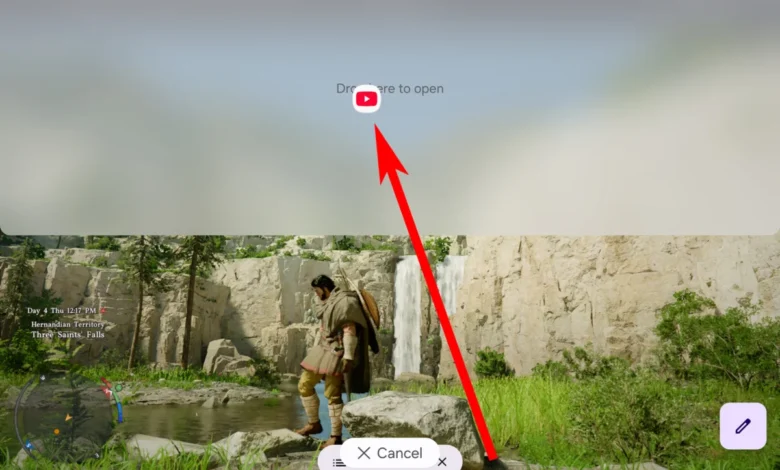
Once activated, the taskbar remains anchored regardless of active application states. Pressing and holding any application icon within this persistent dock enables the system’s split-screen drag-and-drop protocol, allowing operators to position software windows precisely where needed without interrupting background processes.
Advanced Three-Way Split-Screen Mechanics and Layout Customization
Building upon previous generations, the Galaxy Z Fold 8 introduces refined three-way split-screen capabilities paired with dynamic layout shifting. Traditional split-screen implementations restricted users to rigid halves or thirds that frequently rendered text unreadable or compressed visual media past the point of utility. Samsung’s latest software iteration addresses these ergonomic challenges through intelligent window management.

To execute a three-way application split on the Galaxy Z Fold 8:
- Unfold the device to access the expansive inner screen.
- Launch the initial application, such as a web browser or communication tool.
- Press and hold a secondary application icon from the persistent taskbar, dragging it to either the left, right, or top edge of the display until the positional snap indicator appears.
- Access the taskbar or open the application drawer to select a third program.
- Drag the final application into the remaining unoccupied section of the grid.
Rather than enforcing uniform sizing, the Galaxy Z Fold 8 allows users to manipulate the separation boundaries—marked by interactive handles containing visual indicator dots. Dragging these boundaries outward enlarges the primary workspace while compressing adjacent tools into an innovative off-screen suspension state. In this state, secondary applications hover just off the edge of the visible matrix, allowing users to instantly summon a nearly full-screen view with a single tap.

Furthermore, tapping the divider handle reveals additional window management tools, including a grid transformation icon. This feature instantly reorganizes the tripartite display into a hierarchical layout featuring one half-sized primary window accompanied by two quarter-sized secondary panels. Users can also utilize the integrated swap arrow protocol to instantly exchange data streams between frames without closing or re-launching active sessions.
Floating Windows and Desktop-Style Multi-Window Management
Beyond side-by-side and grid-based partitioning, the Galaxy Z Fold 8 supports floating application windows reminiscent of traditional desktop operating systems like Microsoft Windows or macOS. By dragging an application icon directly into the center of the inner display rather than snapping it to an edge, the system launches the program in a resizable, floating window.

This capability bridges the gap between casual media consumption and professional data processing. Users can pin up to four or more active processes on the screen simultaneously—combining split-screen panes with overlapping floating windows. Industry observers note that this flexibility caters directly to enterprise professionals, financial analysts, and content creators who require real-time data monitoring across disparate platforms without the burden of carrying a secondary laptop or tablet.
Broader Industry Implications and Market Impact
The refinement of multitasking architecture in devices like the Galaxy Z Fold 8 highlights a broader shift in the smartphone industry. As hardware maturation plateaus in terms of raw processing power and camera fidelity, software innovation has become the primary battleground for flagship differentiation. Foldable devices, once viewed as fragile novelty items, are steadily capturing a larger share of the premium mobile market.

Market research data from major tech intelligence firms indicates a steady year-over-year increase in foldable device adoption, driven largely by enterprise and power-user segments. By empowering users to execute complex, multi-application workflows natively on a pocketable device, manufacturers are challenging the traditional boundaries of personal computing.
The software optimizations seen in the Galaxy Z Fold 8 demonstrate that hardware flexibility must be matched by intuitive, adaptable operating system layers. As mobile processors continue to incorporate advanced neural processing units (NPUs) and expanded memory bandwidth, features like persistent taskbars, dynamic window scaling, and multi-app orchestration will likely transition from luxury additions to baseline expectations across the smartphone ecosystem.