



Instagram two factor authentication security – Instagram two-factor authentication security is crucial for protecting your account. This in-depth look delves into the fundamental concept of 2FA, examining how Instagram implements it using various methods like SMS and authenticator apps. We’ll explore the benefits of enabling 2FA, the severe risks of disabling it, and steps to enhance your overall Instagram security beyond just 2FA.
From understanding different authentication methods to comparing their strengths and weaknesses, we’ll cover everything you need to know to secure your Instagram account. We’ll also discuss account recovery procedures and the impact of 2FA on this process. Finally, we’ll analyze the user experience of using 2FA on Instagram, and how Instagram can further improve this.
Understanding Two-Factor Authentication (2FA) on Instagram: Instagram Two Factor Authentication Security
Two-factor authentication (2FA) is a crucial security measure that adds an extra layer of protection to your Instagram account. It significantly reduces the risk of unauthorized access, even if someone manages to obtain your password. This layered security approach makes your account much harder to compromise.Two-factor authentication, or 2FA, is a security process that requires two forms of verification to access an account.
This adds a significant barrier to hackers trying to gain unauthorized access, even if they obtain your password. The primary function of 2FA is to prevent unauthorized access by demanding confirmation from a trusted device or application beyond just knowing a password.
Fundamental Concept of 2FA
FA relies on the principle of “something you know” (your password) and “something you have” (a dedicated device or application). This combination makes it far more difficult for attackers to impersonate you. This is because they would need to possess both your password and control of the second verification method.
How Instagram’s 2FA Works
Instagram supports various 2FA methods, each designed to verify your identity in a unique way. The most common methods include SMS-based verification and authenticator apps.
Different Authentication Methods
- SMS-based verification: This method sends a one-time code to your registered mobile phone number. You then enter this code into Instagram to complete the authentication process. This method relies on the security of your phone number and your ability to receive SMS messages. If your phone number is compromised, this method’s security is significantly reduced.
- Authenticator Apps: Authenticator applications, such as Google Authenticator or Authy, generate time-based one-time passwords (TOTP). These apps work by synchronizing with Instagram’s servers to generate unique codes. The advantage of authenticator apps is their enhanced security compared to SMS, as they don’t rely on potentially vulnerable SMS networks.
Benefits of Enabling 2FA
Enabling 2FA on Instagram significantly enhances the security of your account. It acts as a robust barrier against unauthorized access, even if your password is compromised. Protecting your account from unauthorized access is the primary benefit.
Setting Up 2FA on Instagram
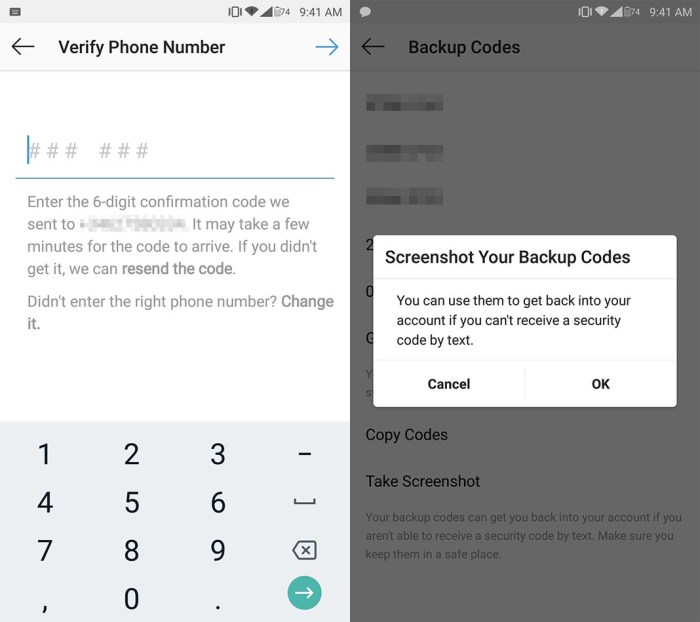
Setting up 2FA on Instagram is a straightforward process. First, navigate to your Instagram settings. Then, locate the security section. Follow the on-screen instructions to select your preferred 2FA method. This usually involves providing your phone number for SMS verification or linking your authenticator app.
Importance of Keeping 2FA Secret
Protecting the security of your 2FA methods is paramount. Never share your 2FA codes or secret keys with anyone. Be cautious about using public Wi-Fi networks when accessing your Instagram account with 2FA enabled, as these networks can be vulnerable to interception. Your 2FA credentials are as critical as your password and should be treated with the same level of confidentiality.
Comparison of 2FA Methods
| Method | Strengths | Weaknesses |
|---|---|---|
| SMS | Widely available, easy to set up. | Relies on SMS infrastructure, potentially vulnerable to interception or SIM swaps. |
| Authenticator Apps | Enhanced security due to time-based codes, less susceptible to interception. | Requires a compatible authenticator app, may require app updates for security patches. |
Security Risks Associated with Disabling 2FA
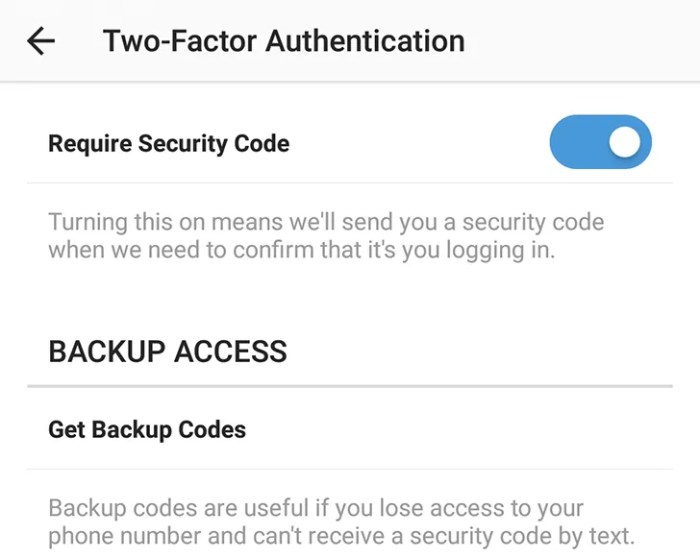
Disabling two-factor authentication (2FA) on Instagram, or any online platform, significantly increases the risk of unauthorized access to your account. This seemingly simple act can expose your personal information, potentially leading to financial losses and reputational damage. Understanding the vulnerabilities associated with disabling 2FA is crucial for maintaining online safety.Deactivating 2FA on Instagram weakens the security barriers protecting your account, leaving it vulnerable to a range of cyberattacks.
This decision effectively reduces the protection afforded by a second layer of authentication, making your account far more susceptible to compromise by malicious actors.
Strong Instagram two-factor authentication is crucial for your account security. Think about how beautiful and captivating the art style of games like gris nintendo switch steam art animation is; a similarly compelling layer of protection is needed for your online presence. Robust security measures like this protect your precious online memories and data from unauthorized access.
Potential Security Vulnerabilities
Disabling 2FA on Instagram exposes your account to various attack vectors, each with the potential to compromise your personal data. The lack of a second authentication factor allows attackers to bypass standard login procedures.
Instagram’s two-factor authentication is crucial for security, but sometimes I wonder if similar robust security measures could be applied to other areas of our lives. Think about how much easier it would be to secure your home with a smart lock that integrates with Google Assistant. A great place to find out about the best smart locks that support Google Assistant is here.
Ultimately, though, Instagram’s two-factor authentication remains a powerful tool for protecting your account and personal information.
Common Threats Exploiting the Absence of 2FA
Several threats exploit the absence of 2FA. These threats include phishing attacks, brute-force attempts, and credential stuffing. Phishing attacks involve tricking users into revealing their passwords, while brute-force attacks involve systematically trying various password combinations. Credential stuffing attacks involve using stolen login credentials from other platforms to gain access to accounts.
How Hackers Might Gain Access without 2FA
Hackers employ various tactics to gain unauthorized access to accounts without 2FA. These tactics include sophisticated phishing campaigns designed to trick users into revealing their passwords. They also use automated tools to conduct brute-force attacks, trying numerous password combinations until a match is found. Furthermore, stolen credentials from other platforms can be used in credential stuffing attacks.
Instagram’s two-factor authentication is crucial for security, but sometimes it feels like a hassle. Keeping your account safe is paramount, especially when considering the latest tech releases like the Xiaomi 15 Ultra Pad 7, which was launched in Europe at MWC ( xiaomi 15 ultra pad 7 launch europe price mwc ). Robust security measures are more important than ever with so many devices and accounts to protect.
Fortunately, Instagram’s two-factor authentication makes a real difference in safeguarding your account.
Likelihood of Account Compromise
The likelihood of account compromise significantly increases when 2FA is disabled. Without 2FA, attackers have a significantly higher chance of successfully gaining access to the account. This is because the additional layer of security provided by 2FA is removed, leaving the account vulnerable to various attack methods. The success rate of such attacks is often high when 2FA is disabled.
Consider the case of a celebrity whose Instagram account was compromised after they disabled 2FA. The account was quickly taken over, and sensitive personal information was leaked.
Comparison to Other Social Media Platforms
The security risks associated with disabling 2FA on Instagram are similar to those faced on other social media platforms. Disabling 2FA on any platform significantly increases the risk of unauthorized access. The fundamental security principles remain the same across all platforms; without 2FA, accounts are more vulnerable to compromise.
Attack Vectors Targeting Accounts without 2FA
| Attack Vector | Description |
|---|---|
| Phishing | Tricking users into revealing their passwords through deceptive emails or messages. |
| Brute-Force Attacks | Systematically trying various password combinations to gain access. |
| Credential Stuffing | Using stolen login credentials from other platforms to access accounts. |
| Malware | Installing malicious software on devices to gain access to accounts. |
| Social Engineering | Manipulating users into revealing their passwords or account information. |
Strengthening Instagram Security Beyond 2FA
Protecting your Instagram account goes beyond simply enabling two-factor authentication (2FA). A multi-layered approach, encompassing strong passwords, vigilance against phishing, and proactive maintenance, is crucial for comprehensive security. This comprehensive strategy ensures your account remains resilient against evolving threats.Protecting your Instagram account is an ongoing effort, not a one-time task. Beyond 2FA, robust password management, awareness of phishing tactics, and regular software updates contribute significantly to overall security.
These measures form a strong defense against unauthorized access and data breaches.
Strong Passwords and Password Management
Robust passwords are the first line of defense against unauthorized access. A strong password is unique, complex, and memorable. It should incorporate a mix of uppercase and lowercase letters, numbers, and symbols. Avoid using easily guessable information like birthdates, names, or common phrases. Consider using a password manager to securely store and manage your various passwords.
Password managers generate strong, unique passwords for each account and securely store them, significantly enhancing your account security. Using a password manager effectively mitigates the risk of weak or reused passwords.
Recognizing and Avoiding Phishing Attempts, Instagram two factor authentication security
Phishing attempts are a common tactic used to steal login credentials and personal information. Phishing emails, messages, or websites often appear legitimate, but they are designed to trick you into revealing sensitive data. Be wary of unsolicited requests for personal information, especially login credentials. Verify the authenticity of any email or message requesting login details by checking the sender’s email address and contacting Instagram directly if you have any doubts.
Crucially, scrutinize the URL of any website you visit for suspicious activity. A slight alteration in the URL could signal a phishing attempt.
Regularly Updating Instagram Applications and Software
Keeping your Instagram applications and operating system updated is vital for security. Updates often include crucial security patches that address vulnerabilities. These vulnerabilities could be exploited by attackers to gain unauthorized access to your account. Ensure your Instagram app and the devices you use to access your account are always up-to-date.
Keeping Personal Information Private
Avoid sharing personal information, such as your address, phone number, or financial details, on your Instagram profile. This information is highly sensitive and could be used by malicious actors to gain access to your account or other personal data. Be cautious about the information you share publicly on social media platforms.
Best Practices for Overall Instagram Account Security
| Category | Best Practice |
|---|---|
| Password Management | Use a unique, strong password for each account, and consider a password manager for secure storage. |
| Phishing Awareness | Be cautious of unsolicited requests for personal information and scrutinize emails and websites for suspicious activity. |
| Software Updates | Regularly update your Instagram app and operating system to benefit from security patches. |
| Personal Information | Avoid sharing sensitive personal information on your profile to protect against potential misuse. |
| Two-Factor Authentication | Always enable two-factor authentication (2FA) for enhanced security. |
Account Recovery and 2FA
Two-factor authentication (2FA) significantly strengthens account security, making it much harder for unauthorized individuals to access your Instagram account, even if they manage to guess your password. This enhanced security comes at the cost of a slightly more complex account recovery process. Understanding how 2FA impacts recovery procedures is crucial for anyone who values their online safety.Account recovery procedures are fundamentally altered when 2FA is enabled.
Without 2FA, a compromised account is much easier to recover, often requiring only a valid email address or phone number. However, with 2FA in place, a verified secondary method of authentication is essential. This dramatically reduces the risk of unauthorized access and makes the recovery process more secure.
Impact on Account Recovery Procedures
FA significantly alters the recovery process. It necessitates verification beyond simply knowing the password. This extra layer of security ensures that only the legitimate account owner can regain access, mitigating the risk of account takeover.
Difficulties in Recovering an Account Without 2FA
Recovering an Instagram account without 2FA enabled is relatively straightforward. The process often involves providing information like your email address or phone number associated with the account. Verification of this information confirms the user’s identity and allows access to the account.
Difficulties in Recovering an Account With 2FA
Recovering an account with 2FA enabled presents more hurdles. Simply knowing the password is insufficient. The recovery process mandates verification of the 2FA method, usually a secondary device or authenticator app. This is essential to confirm the user’s possession of the account’s security credentials.
Steps to Take if a User Loses Access to Their 2FA Method
Losing access to a 2FA method can be frustrating, but it’s not necessarily the end of the world. The first step is to contact Instagram support immediately. They can guide you through the account recovery process, often requiring a verification process involving the recovery options provided by Instagram.
Recovering an Instagram Account Using 2FA
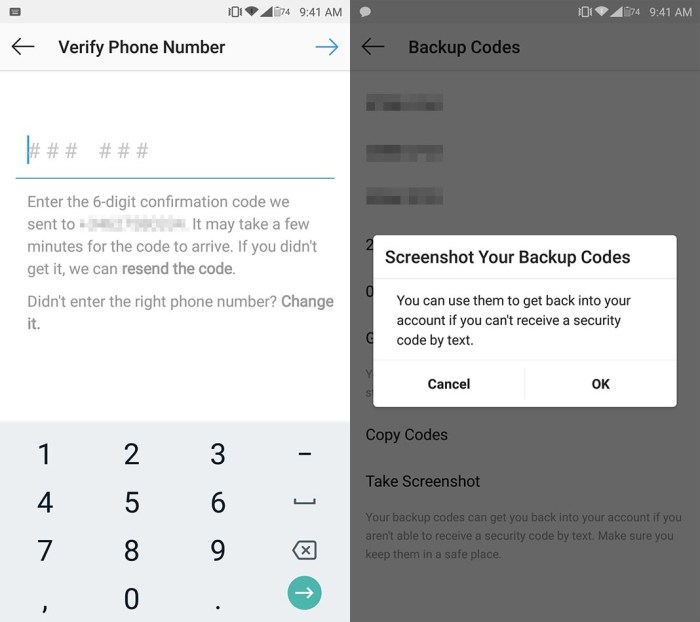
Instagram’s 2FA recovery process often involves a multi-step procedure. Users need to provide verification from a secondary device or authenticator app. This often involves retrieving a recovery code or using an alternative recovery method.
Step-by-Step Guide for Account Recovery When 2FA is Enabled
- Contact Instagram Support: Immediately contact Instagram support for assistance.
- Provide Necessary Information: Provide account details and any information that may be helpful for verification.
- Verify Identity: Follow the instructions provided by Instagram support to verify your identity. This might involve answering security questions or providing further details about your account.
- Choose Recovery Method: Select a recovery method from those available, like an alternative email or phone number.
- Verify Recovery Method: Verify the selected recovery method with the information provided during the recovery process.
- Complete Recovery: Follow the steps Artikeld by Instagram to complete the account recovery process.
Comparison of Recovery Options with and without 2FA
| Feature | Account Recovery without 2FA | Account Recovery with 2FA |
|---|---|---|
| Verification | Email/Phone Number Verification | 2FA Method Verification (e.g., Authenticator App, Backup Code) |
| Complexity | Relatively Simple | More Complex, Requires Multiple Steps |
| Security | Lower | Higher |
User Experience and 2FA on Instagram
Instagram’s popularity hinges on a seamless user experience. Two-Factor Authentication (2FA) is a critical security measure, but its implementation can significantly impact how users interact with the platform. A poor 2FA experience can deter users, potentially leading to security vulnerabilities due to users disabling the feature. Conversely, a well-designed 2FA process can enhance user trust and engagement.A smooth 2FA process strengthens user trust, making them more likely to maintain the security measures and actively participate in the platform.
A cumbersome or confusing setup can lead to user frustration and a higher likelihood of bypassing security for convenience. Understanding the user experience associated with 2FA is crucial for Instagram to maintain a secure and engaging platform.
Ease of Use of Different 2FA Methods
Different 2FA methods vary in their ease of use. SMS-based 2FA, while readily available, can be vulnerable to SIM swapping attacks. Authentication apps, like Google Authenticator, provide a more secure alternative, but require users to install and configure the app. Security keys, physical devices that generate one-time codes, offer the strongest security but require a learning curve.
Instagram should consider the relative ease of use and security implications when determining the optimal 2FA method.
Impact of 2FA on Overall User Experience
FA affects user experience in several ways. A positive user experience includes a quick, straightforward process with minimal disruption to normal use. The time taken to verify 2FA should be short and not impede the overall use of the platform. The process should be intuitive and consistent across all devices and platforms.
User Journey Map for Setting Up and Using 2FA
A user journey map details the steps a user takes when setting up and using 2FA on Instagram. The journey begins with the user logging into their Instagram account. Next, they are prompted to enable 2FA. The process involves selecting a preferred method (e.g., SMS, authenticator app, or security key). This step requires user input and verification.
After successfully configuring 2FA, the user is required to verify their identity through the chosen method. Finally, the user can continue using their Instagram account.
Improving Instagram’s 2FA User Experience
Instagram can improve the user experience of 2FA by:
- Providing clear and concise instructions during the setup process.
- Offering multiple 2FA options, allowing users to choose the method that best suits their needs and security preferences.
- Implementing a streamlined verification process with minimal steps.
- Providing robust support resources, such as FAQs and help articles, to address user issues.
- Offering clear and visible progress indicators throughout the 2FA setup process.
User Feedback on Instagram’s 2FA Implementation
User feedback regarding 2FA implementation can be valuable for understanding pain points and areas for improvement.
| Feedback Category | Example Comments |
|---|---|
| Simplicity | “The setup process was too complicated.” “I had trouble getting started.” |
| Security Concerns | “I’m worried about SMS-based 2FA.” “I’m concerned about my account security.” |
| App Compatibility | “The app doesn’t work on my phone.” “The app keeps crashing.” |
| Support | “I need help with my 2FA setup.” “There aren’t enough resources to guide me.” |
Final Conclusion
In conclusion, implementing Instagram two-factor authentication security is paramount for safeguarding your online presence. By understanding the intricacies of 2FA, recognizing the risks of disabling it, and implementing robust security measures beyond 2FA, you can significantly reduce the likelihood of unauthorized access. This comprehensive guide equips you with the knowledge to maintain a secure Instagram account and navigate the digital landscape confidently.