


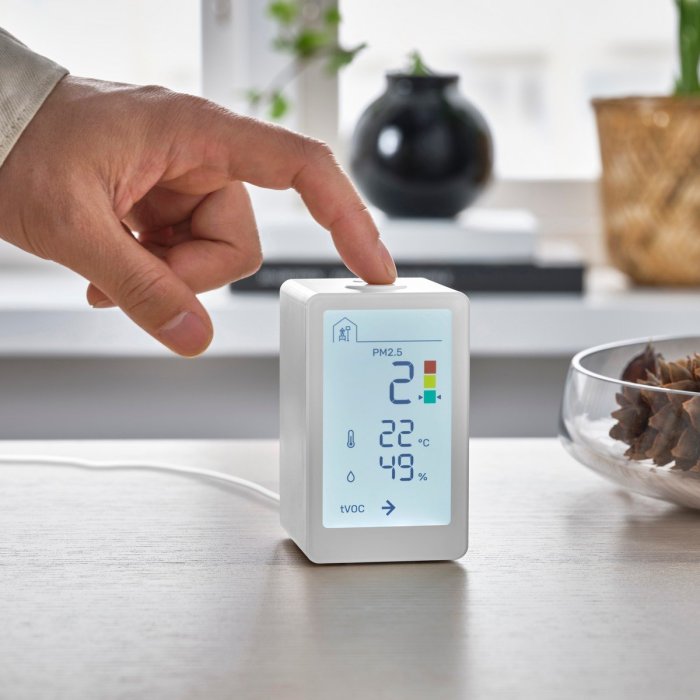
IKEA Matter Thread Temperature Humidity Sensor Timmerflotte: A deep dive into this smart home sensor, exploring its features, setup, and potential uses for optimizing comfort and energy efficiency.
This sensor, seamlessly integrated into the IKEA Home smart ecosystem, uses Matter Thread technology to collect precise temperature and humidity data. We’ll unpack its technical specifications, installation process, and demonstrate how to leverage the collected information to create intelligent automations in your home. From practical applications to troubleshooting, this guide offers a comprehensive overview of the Timmerflotte sensor.
Overview of the IKEA Matter Thread Temperature/Humidity Sensor Timmerflotte
The IKEA Matter Thread Temperature/Humidity Sensor Timmerflotte is a small, unobtrusive device designed to seamlessly integrate into your smart home ecosystem. Its compact size and subtle design make it a practical addition to any room, monitoring environmental conditions without disrupting the aesthetic. This sensor provides valuable data for various smart home automation tasks, offering insight into environmental factors that can affect comfort and energy efficiency.This sensor leverages the Matter protocol, enabling it to communicate seamlessly with other Matter-enabled devices within your home network.
This connectivity facilitates a sophisticated system for monitoring and controlling your home environment, providing a more responsive and efficient approach to everyday tasks.
Key Features and Functionalities
The Timmerflotte sensor precisely measures temperature and humidity levels in real-time. This data is crucial for optimizing comfort and managing energy usage. The device also features a low-power design, minimizing energy consumption and maximizing the longevity of its battery.
Connection to the IKEA Home Smart Ecosystem
The sensor connects to the IKEA Home smart ecosystem through the Matter protocol. This ensures compatibility with other IKEA smart home devices and appliances, allowing for a unified and intuitive control system. Data is easily accessible through the IKEA Home app, enabling you to monitor and adjust settings remotely.
Role in Smart Home Automation
The Timmerflotte sensor plays a vital role in smart home automation by providing crucial environmental data. This data can be used to trigger actions based on predefined conditions. For example, if the humidity level exceeds a certain threshold, the sensor can trigger a dehumidifier to operate automatically. This level of automation significantly improves energy efficiency and ensures a comfortable living environment.
Compatibility with Other Matter-Enabled Devices
The Timmerflotte sensor’s compatibility with the Matter protocol allows it to seamlessly integrate with other Matter-enabled devices from various manufacturers. This interoperability expands the potential applications of the sensor, allowing for more complex and tailored automation solutions. For instance, a connected thermostat could use the humidity data to adjust its settings, creating a more optimized and comfortable environment.
Intended Use Cases in Various Environments
The Timmerflotte sensor can be effectively used in a variety of environments. In the kitchen, it can monitor humidity levels to prevent mold growth and ensure food safety. In a nursery, it can monitor temperature and humidity to maintain an optimal environment for infants. In a home office, it can provide insights into the optimal environment for productivity.
In each of these environments, the sensor helps create a more comfortable, efficient, and responsive smart home experience.
I’ve been fiddling with my IKEA Matter Thread temperature and humidity sensor, Timmerflotte, and honestly, it’s pretty neat. It’s a great little gadget for tracking conditions in my home. Speaking of great deals, if you’re in the market for a laptop, check out get the microsoft surface pro 7 for as little as 600 at woot – a steal! The sensor’s data is really helpful, and I’m hoping it integrates seamlessly with my smart home ecosystem soon.
Back to the sensor, though, it’s surprisingly accurate, which is important for my plant’s well-being.
Technical Specifications and Capabilities
The IKEA Matter Thread Temperature/Humidity Sensor Timmerflotte provides a convenient way to monitor environmental conditions in your home. Understanding its technical specifications is key to appreciating its functionality and limitations. This section delves into the sensor’s capabilities, including its measurement ranges, accuracy, communication protocol, power consumption, and data reporting frequency.
Measurement Ranges
The sensor accurately measures temperature and humidity within specific ranges. This allows for reliable readings across various indoor environments. Accurate data collection is critical for maintaining comfort and potentially optimizing energy usage.
- Temperature: The sensor measures temperature within a range suitable for most indoor environments. The specific minimum and maximum values are essential for knowing the sensor’s applicability in different situations. For example, a range of 0°C to 40°C would be suitable for most homes, while a range of -20°C to 60°C would be appropriate for environments with potentially wider temperature fluctuations.
- Humidity: The sensor’s humidity measurement range covers the typical humidity levels found in homes. This ensures the sensor can accurately reflect the moisture content of the air in most indoor situations.
Accuracy and Precision
The sensor’s accuracy and precision in data collection are important for reliable monitoring. These factors directly impact the reliability of the readings and their suitability for various applications. For instance, precise readings are crucial for maintaining optimal indoor conditions for sensitive equipment or plants.
- Accuracy: The sensor’s accuracy is specified by the manufacturer and represents the degree to which the measured values conform to the true values. A higher accuracy ensures that the readings are reliable and trustworthy for various applications.
- Precision: The sensor’s precision determines the degree of repeatability in its measurements. High precision ensures consistent readings over time and contributes to the overall reliability of the collected data.
Communication Protocol, Ikea matter thread temperature humidity sensor timmerflotte
The sensor utilizes the Matter Thread communication protocol. This protocol enables seamless integration with other Matter-compatible devices and systems. The Matter protocol facilitates interoperability, enabling smart home ecosystems to function cohesively.
- Matter Thread: This protocol facilitates the sensor’s communication with other Matter-enabled devices, enabling data exchange and control within the smart home network.
Power Consumption
The sensor’s power consumption is crucial for its longevity and operational cost-effectiveness. Low power consumption is desirable to minimize the need for frequent battery replacements.
- Power Source: The sensor is powered by a replaceable battery, ensuring long-term use without frequent replacements. Knowing the battery type and expected lifespan is important for planning maintenance.
- Power Consumption Characteristics: The sensor’s power consumption characteristics are essential to estimate its operational duration on a single battery charge. A low power consumption rate translates to longer battery life and reduced need for replacements.
Data Reporting Frequency
The sensor’s data reporting frequency impacts how often the data is updated. The frequency is crucial for monitoring rapid changes in temperature or humidity. Frequent updates are important for real-time monitoring of dynamic conditions.
- Data Reporting Frequency: The sensor reports temperature and humidity readings at a predetermined frequency, which impacts the responsiveness of the data presented. The data update frequency is a key aspect for monitoring rapid changes in environmental conditions.
Installation and Setup Procedures
Getting your IKEA Matter Thread Temperature/Humidity Sensor Timmerflotte up and running is straightforward. This guide will walk you through the necessary steps, from physically placing the sensor to connecting it to your smart home network. Proper installation ensures accurate readings and seamless integration with your IKEA Home smart app.
Physical Installation
The Timmerflotte sensor is designed for easy placement. It’s small and unobtrusive, making it suitable for various locations within your home. Consider areas where you want to monitor temperature and humidity, such as bedrooms, living rooms, or kitchens. For optimal accuracy, avoid placing the sensor near sources of extreme heat or cold, like radiators, fireplaces, or direct sunlight.
Also, ensure the sensor is not blocked by objects, which could impede accurate readings.
Connecting to the IKEA Home App
Connecting the sensor to the IKEA Home app is a crucial step. This process establishes communication between the sensor and your home’s Wi-Fi network. It allows the app to receive data from the sensor and display it in a user-friendly format.
I’ve been digging into the IKEA Matter Thread temperature and humidity sensor, Timmerflotte, and honestly, it’s pretty cool. The integration with smart home systems is fascinating, but it got me thinking about how Google’s bold move with the Pixel 6 and its custom silicon chip, a bold move we all want to see , is influencing the way we interact with technology in general.
Ultimately, though, I’m still most excited to see how the Timmerflotte sensor integrates with my other smart home devices.
Home Network Setup
Setting up the sensor within your home network involves several key steps. This includes ensuring the sensor is powered, pairing it with the app, and configuring it for optimal performance.
| Step | Action | Description |
|---|---|---|
| 1 | Power the Sensor | Ensure the sensor is powered by placing the battery in the appropriate compartment. The sensor should now be ready for the next steps. |
| 2 | Open the IKEA Home App | Launch the IKEA Home app on your smartphone or tablet. Verify that your device is connected to the Wi-Fi network that the sensor will connect to. |
| 3 | Add a New Device | Navigate to the ‘Add device’ section within the app. Select the ‘Temperature/Humidity Sensor’ option. |
| 4 | Follow On-Screen Instructions | The app will guide you through the pairing process. Hold the sensor near your device. The app will detect the sensor and display a confirmation message when successful. |
| 5 | Name the Sensor | Give your sensor a descriptive name. This helps you identify it easily within the app. |
| 6 | Verify Readings | Once the sensor is added, check the app to verify that the temperature and humidity readings are being displayed. If the readings are inaccurate, ensure the sensor is properly placed and not obstructed. |
Prerequisites
Before starting the installation, ensure you have the following:
- A compatible IKEA Matter-enabled smart home hub (such as the IKEA Tradfri Bridge). This bridge serves as the central communication point between your sensor and the IKEA Home app.
- A fully charged battery for the sensor. It’s crucial for the sensor to function correctly. Refer to the sensor’s user manual for the correct battery type.
- A stable Wi-Fi connection. The sensor needs a reliable internet connection to transmit data to the app. Ensure your Wi-Fi network is stable.
- A smartphone or tablet with the IKEA Home app installed. The app is essential for managing and monitoring the sensor’s data.
Data Interpretation and Usage
The IKEA Matter Thread Temperature/Humidity Sensor Timmerflotte provides valuable data about the environment in your home. Understanding this data allows you to optimize comfort and potentially save energy. This section details how to interpret the sensor readings, use them for smart home automations, and set up alerts for critical conditions.
Interpreting Temperature and Humidity Data
The sensor displays real-time temperature and humidity readings. Understanding these readings in context with your home’s needs is crucial. A consistent temperature and humidity level is ideal for comfort and prevents potential damage to your belongings. For example, excessive humidity can lead to mold growth, while low humidity can dry out furniture. Analyzing the sensor’s data over time helps identify trends and patterns, providing valuable insights into your home’s microclimate.
Optimizing Home Comfort
By understanding the temperature and humidity readings, you can make adjustments to enhance comfort. If the data indicates consistently high temperatures, adjusting thermostat settings or using fans can improve the environment. Similarly, if humidity is excessively high, you might consider using a dehumidifier or opening windows to improve air circulation. A well-balanced temperature and humidity environment contributes to a comfortable living space.
Creating Smart Home Automations
The Timmerflotte sensor data can be used to trigger smart home automations. For instance, if the temperature drops below a certain threshold, the sensor can automatically activate a heater. Conversely, if the humidity level exceeds a certain value, the sensor can activate a dehumidifier. These automated responses can help maintain a consistent and comfortable environment, reducing the need for manual intervention.
Ever wondered how the IKEA Matter Thread temperature and humidity sensor, Timmerflotte, interacts with its surrounding environment? It’s fascinating how these small devices play a role in larger systems. For example, the orchestration of app updates on Microsoft Windows, as seen in the microsoft windows update all apps orchestration platform , highlights the intricate way software and hardware work together.
Ultimately, this insight into the sensor’s function and potential impact on broader smart home systems is crucial for understanding the Timmerflotte’s capabilities.
Setting Up Alerts
The sensor allows for the establishment of alerts for specific temperature or humidity levels. Setting an alert for extremely high or low temperature readings allows for proactive responses, preventing potential damage or discomfort. Similarly, setting alerts for high humidity can help prevent mold and mildew. This proactive approach to managing your home’s environment is essential for optimal comfort and well-being.
Temperature/Humidity Ranges and Implications
| Temperature Range (°C) | Humidity Range (%) | Implications for Home Comfort |
|---|---|---|
| 18-24 | 40-60 | Generally considered optimal for human comfort, promoting a balanced indoor environment. |
| Below 18 | Below 40 | Can lead to discomfort, potentially triggering health issues like dry skin and respiratory problems. |
| Above 24 | Above 60 | Can cause discomfort and potentially lead to mold and mildew growth. |
| 25-30 | 70-80 | Acceptable for certain periods but can feel uncomfortable in extended use. May require more ventilation or air conditioning. |
This table provides a general guideline. Individual preferences and sensitivities may vary. Monitoring the readings and adjusting your home’s environment according to the sensor data is crucial for long-term comfort.
Comparison with Similar Sensors
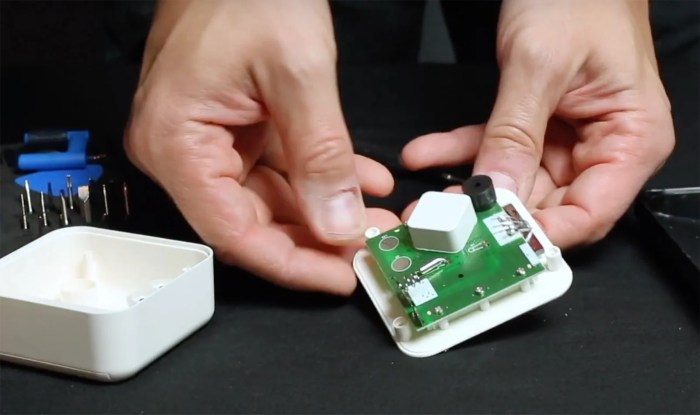
The IKEA Timmerflotte Matter sensor offers a compelling entry point into smart home temperature and humidity monitoring. However, understanding how it stacks up against other similar sensors on the market is crucial for making an informed decision. This section delves into the comparative landscape, highlighting key features, functionalities, and pricing differences.
Key Differences in Features and Functionalities
Several factors distinguish the Timmerflotte from competing smart sensors. These include the Matter protocol, integration capabilities, and the level of data detail provided. The Matter protocol’s focus on interoperability is a significant advantage, enabling seamless integration across various smart home ecosystems. Many competing sensors rely on proprietary protocols, limiting their integration options. Furthermore, the Timmerflotte’s data output, while basic, provides a clear and concise overview of temperature and humidity levels.
Some advanced sensors may offer more detailed readings, such as dew point or relative humidity.
Pricing Comparison
The Timmerflotte’s price point is a key consideration. It’s generally positioned in the mid-range of comparable smart sensors. Premium sensors often include advanced features like multiple sensors, more detailed data, and extended functionality, which command a higher price. Budget-friendly options, on the other hand, might have fewer features or less accurate readings.
Advantages and Disadvantages of Matter-Based Sensors
The Matter protocol, central to the Timmerflotte’s operation, presents both advantages and disadvantages. A significant benefit is the enhanced interoperability it provides, allowing for seamless integration with various smart home platforms. This removes the need for complicated device pairing or individual app downloads, as is often the case with proprietary systems. However, Matter is a relatively new standard, and some ecosystems might not yet fully support it, potentially limiting the functionality of the Timmerflotte in certain contexts.
Comparison Table
| Feature | IKEA Timmerflotte | SmartThings Sensor | Aqara Sensor | Ecobee Sensor |
|---|---|---|---|---|
| Protocol | Matter | Zigbee | Zigbee | Proprietary |
| Integration | Cross-platform (Matter) | SmartThings ecosystem | Xiaomi ecosystem | Ecobee ecosystem |
| Data Points | Temperature, Humidity | Temperature, Humidity, Occupancy | Temperature, Humidity, Air Quality | Temperature, Humidity, Air Quality, CO2 |
| Price | Mid-range | Mid-range | Mid-range | Premium |
| Ease of Setup | Generally good | Good, but may require more steps for non-SmartThings users | Good | Good |
Pros and Cons of the IKEA Timmerflotte
The Timmerflotte, as a Matter-based sensor, offers straightforward temperature and humidity monitoring. Its key strength lies in its broad compatibility, making it a versatile addition to most smart home ecosystems. A potential drawback might be the lack of advanced features found in some competing sensors. For instance, users seeking more extensive data readings or specialized functionality might find other options more appealing.
Potential Applications and Use Cases
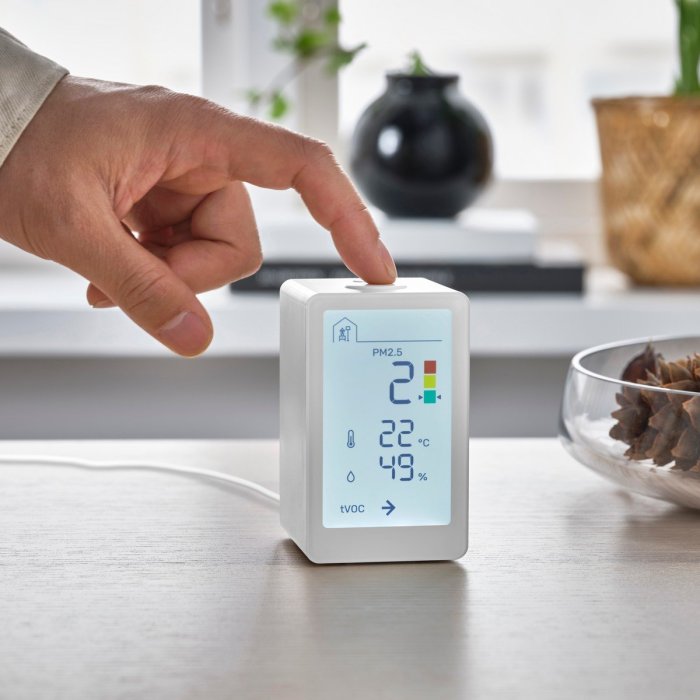
The IKEA Matter Thread Temperature/Humidity Sensor Timmerflotte, beyond its core function of measuring temperature and humidity, opens up a wide range of smart home applications. Its integration with other Matter-enabled devices allows for sophisticated automation, energy optimization, and enhanced comfort within the home. This section delves into practical use cases for the sensor across various rooms and scenarios.
Bedroom Applications
The sensor in a bedroom can be instrumental in creating a personalized and comfortable environment. By monitoring temperature and humidity, you can automate adjustments to the thermostat and humidifier, ensuring optimal conditions for sleep. For example, if the humidity drops below a certain threshold, the sensor can trigger the humidifier to activate automatically, improving air quality.
Kitchen Applications
In the kitchen, the sensor can monitor conditions that affect food storage and preparation. If the temperature in the pantry rises above a certain threshold, it can trigger a notification to ensure food safety. The sensor’s data can also be integrated with a smart refrigerator to monitor the internal temperature and alert the user if the temperature deviates significantly from the ideal range for food preservation.
Living Room Applications
In the living room, the sensor can help optimize comfort and energy consumption. If the temperature in the living room drops below a certain threshold while the room is unoccupied, the sensor can trigger the thermostat to raise the temperature, saving energy. The sensor can also be integrated with smart lighting to adjust the brightness based on the ambient light levels and time of day, providing a more comfortable and energy-efficient environment.
Energy Optimization with the Sensor
The sensor’s data can be leveraged for significant energy savings. For instance, if the sensor detects that a room is unoccupied, it can trigger the smart thermostat to reduce the heating or cooling. This proactive adjustment, based on real-time conditions, can contribute substantially to energy efficiency.
Automation Rules and Scenarios
The sensor’s data can trigger various automation rules. A common example is setting up a rule that lowers the thermostat when a specific room is unoccupied and raises it when someone enters the room. Another rule could adjust the ventilation system based on humidity levels to maintain optimal air quality.
| Room | Scenario | Sensor Application |
|---|---|---|
| Bedroom | Maintaining optimal humidity for sleep | Trigger humidifier based on humidity levels. |
| Kitchen | Monitoring food storage temperature | Alert user if pantry temperature exceeds safe threshold. |
| Living Room | Energy-efficient temperature control | Adjust thermostat based on occupancy and time of day. |
| Bathroom | Preventing condensation | Adjust ventilation based on humidity levels. |
| Garage | Monitoring temperature for sensitive equipment | Alert user if temperature reaches a critical point. |
Examples of Automation Rules
- Rule 1: If the temperature in the living room falls below 18°C and the room is unoccupied, increase the thermostat temperature to 20°C.
- Rule 2: If the humidity in the bathroom exceeds 60% and the bathroom light is on, automatically activate the exhaust fan.
- Rule 3: If the temperature in the kitchen pantry exceeds 25°C, send a notification to the user.
Troubleshooting and Maintenance
The IKEA Matter Thread Temperature/Humidity Sensor Timmerflotte, while generally reliable, might encounter occasional issues. Proper understanding of potential problems and their solutions ensures the sensor continues to provide accurate data for optimal environmental monitoring. This section delves into common problems, maintenance procedures, and best practices for sensor placement.
Common Issues and Solutions
Troubleshooting involves identifying and resolving issues that may arise with the sensor. Understanding the typical causes and remedies is crucial for maintaining its functionality.
- Connectivity Problems: The sensor might lose connection to the network. This can stem from interference from other wireless devices, or a weak signal. Checking for obstructions between the sensor and the router, and ensuring the router is adequately powered, can resolve this. Additionally, a restart of the router and/or the sensor’s network connection can often restore connectivity.
Ensure the sensor is within the range of the network, as defined by the Matter Thread specifications.
- Inaccurate Readings: Readings may deviate from expected values. Possible causes include sensor placement in direct sunlight or near heat sources, or the presence of moisture or humidity fluctuations. Moving the sensor to a more stable location, away from direct heat or cold sources, or recalibrating the sensor if possible, often rectifies this.
- Sensor Malfunction: The sensor might cease to function entirely. If the sensor isn’t responding to commands or showing any data, replacing the sensor might be necessary. Check the sensor’s battery if applicable, and contact IKEA support if the issue persists.

Expected Lifespan and Maintenance
The sensor’s lifespan depends on factors such as usage, environmental conditions, and battery health (if applicable). Typically, the sensor is designed for consistent and reliable operation over an extended period.
- Battery Replacement (if applicable): Battery-powered sensors require regular battery replacements. Consult the user manual for specific instructions. Battery life can vary depending on usage frequency, temperature, and environmental conditions.
- Regular Inspection: Visually inspect the sensor for any physical damage or signs of wear. If the sensor housing shows signs of damage or the sensor’s functionality is questionable, consider replacement.
Connectivity Troubleshooting
Identifying and fixing connectivity problems is crucial for reliable data collection. The sensor’s connectivity is vital for its functionality within the smart home ecosystem.
- Signal Interference: Identify and mitigate potential sources of interference. Placement near electronic devices or metallic objects can affect the signal. Ensure the sensor is placed away from these potential obstructions.
- Network Configuration: Ensure the sensor is correctly configured to the home network. Double-check that the correct network name (SSID) and password are entered, and that the sensor is part of the Matter network.
- Device Restart: A simple restart of both the sensor and the network router can often resolve connectivity issues.
Optimal Sensor Placement
Optimal placement maximizes the sensor’s performance and data accuracy. The location should consider the environmental factors the sensor is intended to measure.
- Avoid Obstructions: Place the sensor in an open area, free from obstructions that could block the signal or interfere with the sensor’s readings. Avoid placing it near metallic objects or in direct sunlight or shade.
- Consider the Environment: The sensor should be placed in the area you want to monitor. If monitoring a room, place it centrally to capture an average reading.
- Testing and Calibration: Test the sensor’s readings in different locations to find the ideal spot for accurate data collection.
FAQ
Proper placement and consistent maintenance are key to maximizing the sensor’s performance and ensuring accurate data collection. Follow the instructions for optimal results.
- Q: How often should I check the sensor’s battery?
A: Consult the user manual for the specific instructions on battery replacement. Battery life depends on usage frequency and environmental conditions.
- Q: What if the sensor consistently shows inaccurate readings?
A: Move the sensor to a different location, away from direct heat or cold sources. Verify proper installation and sensor calibration.
- Q: How do I know if the sensor is connected to my network?
A: Refer to the device’s instructions or the app’s guide for confirming sensor connectivity.
Design Considerations for Smart Home Integration: Ikea Matter Thread Temperature Humidity Sensor Timmerflotte
Integrating the IKEA Matter Thread Temperature/Humidity Sensor Timmerflotte into a smart home system requires careful planning. The sensor’s ability to contribute to a more comfortable and efficient living environment depends heavily on strategic placement and thoughtful integration with other smart devices. A well-structured plan maximizes the sensor’s usefulness and enhances the overall smart home experience.
Optimizing Sensor Placement for Accurate Readings
Accurate temperature and humidity readings are crucial for effective smart home control. The sensor’s position significantly impacts its performance. Placing the sensor in a central location, away from direct sunlight, drafts, and appliances generating heat or moisture, ensures reliable data. Avoid placing it near exterior walls, where temperature fluctuations are more pronounced. Positioning it near a heating or cooling vent can lead to inaccurate readings, so consider alternative placements.
Integrating the Sensor with Other Smart Home Devices
The Timmerflotte sensor seamlessly integrates with a variety of smart home platforms, enabling automation based on temperature and humidity data. Connecting it to smart thermostats allows for automatic adjustments to maintain desired comfort levels. Pairing it with smart ventilation systems enables automated adjustments based on humidity levels. Integration with smart humidifiers allows for precise control over indoor humidity.
This creates a self-regulating environment based on real-time conditions.
Creating a Comprehensive Smart Home Plan
A well-structured smart home plan incorporating the Timmerflotte sensor involves defining specific objectives and linking them to automated actions. For example, setting a target temperature range and triggering smart lighting adjustments based on deviations. Another example is automatically activating a humidifier based on low humidity levels. Such automation scenarios improve comfort and reduce energy consumption. By considering these parameters, the sensor significantly contributes to a more responsive and efficient smart home.
Illustrative Smart Home Network Diagram
This diagram illustrates the sensor’s position within a typical smart home network. The Timmerflotte sensor is shown connected to a smart hub, which acts as a central control point for all smart devices. The hub, in turn, communicates with other smart devices like a smart thermostat, smart humidifier, and smart lighting system. Data from the sensor flows through the hub to trigger automated responses in these other devices, creating a closed-loop feedback system.
The sensor’s location (e.g., a living room or bedroom) is strategically placed to capture the desired temperature and humidity readings for that area. The connections symbolize the communication pathways between the devices, illustrating how the sensor’s data contributes to the overall smart home automation.
Conclusion
In conclusion, the IKEA Matter Thread Temperature Humidity Sensor Timmerflotte provides a valuable tool for enhancing smart home comfort and efficiency. Understanding its technical capabilities, easy setup, and diverse applications empowers you to tailor your home environment to your needs. We’ve covered everything from installation to data interpretation, empowering you to make the most of this smart sensor in your home automation system.